¡Tiempo de descanso!
Tu sesión Pomodoro ha terminado
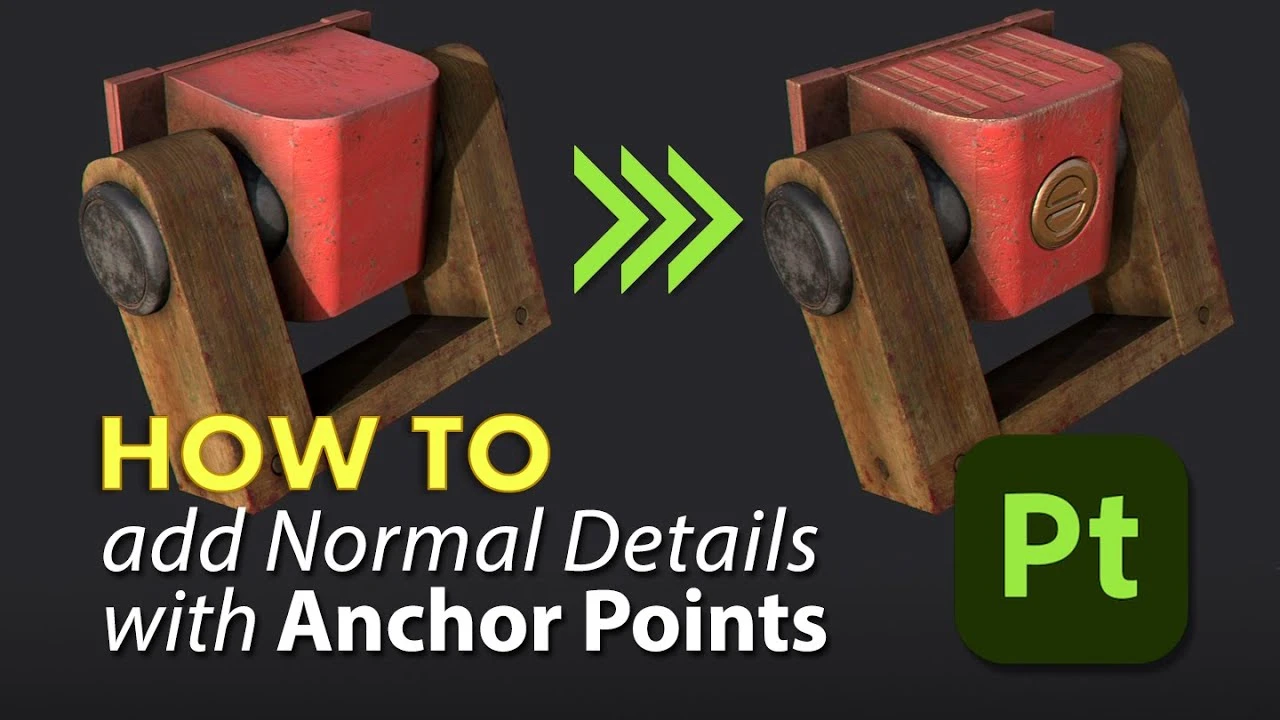
How To : Add Normal Details with Anchor Points in Substance Painter
Principiante🍅 Timer Pomodoro
Estudia 25 min, luego toma un descanso. ¡Mejora la concentración!
Descripción
The SOURCE FILES can be downloaded via https://www.patreon.com/posts/source-...
Check out my Substance3D playlist via: • Adobe Substance Series
You can access our shop via: / @sarkamari
Anchor Points open up a whole new set of possibilities, allowing you to effectively link layers and have a single Anchor point affect multiple aspects of your project, transforming Substance 3D Painter into a truly non-linear experience. In this video, I'll show you a quick and easy way to use an Anchor point in conjunction with our Normal channel to add details to your scene.
We start by nominating the right texture set, then we create a paint layer for our normal information and then reference them to our Filters by adding an anchor point. I hope you find this video useful. So, let's get started
Follow me on:
https://x.com/@Sarkamari1
/ sarkamari.cg
/ sarkamari
Bookmarks:
00:00 Let's Get Started
00:36 What is an Anchor Point?
02:33 Adding Normal Channel
04:28 Inserting Maps
12:00 Add an Anchor Point
#sarkamari @sarkamari @Substance3D
Music by Vlog No Copyright Music
Intro music by Limujii - Sweet Talks (No Copyright Music)
Audio Library — Music for content creators: • Sweet Talks – Limujii (No Copyright Music)
Check out my Substance3D playlist via: • Adobe Substance Series
You can access our shop via: / @sarkamari
Anchor Points open up a whole new set of possibilities, allowing you to effectively link layers and have a single Anchor point affect multiple aspects of your project, transforming Substance 3D Painter into a truly non-linear experience. In this video, I'll show you a quick and easy way to use an Anchor point in conjunction with our Normal channel to add details to your scene.
We start by nominating the right texture set, then we create a paint layer for our normal information and then reference them to our Filters by adding an anchor point. I hope you find this video useful. So, let's get started
Follow me on:
https://x.com/@Sarkamari1
/ sarkamari.cg
/ sarkamari
Bookmarks:
00:00 Let's Get Started
00:36 What is an Anchor Point?
02:33 Adding Normal Channel
04:28 Inserting Maps
12:00 Add an Anchor Point
#sarkamari @sarkamari @Substance3D
Music by Vlog No Copyright Music
Intro music by Limujii - Sweet Talks (No Copyright Music)
Audio Library — Music for content creators: • Sweet Talks – Limujii (No Copyright Music)
A continuación
¡Crea este Diorama Realista! Tutorial de UVs en Maya y Texturizado en Substance Painter
Blender Deluxe Tutoriales
Achieve Stunning Stylized Textures in Substance 3D Painter | Adobe Substance 3D
Adobe Substance 3D
Painting Opacity Maps in Substance Painter
Abe Leal 3D
Stylized hand-painted texturing | Game character - New stylised filter substance painter
VOIDART SCHOOL
Anchor Point Magic 01 - Double Layer Setup in Substance 3D Painter | Adobe Substance 3D
Adobe Substance 3D
Substance Painter - NEW Hand Painted Filters
Abe Leal 3D
Trim Sheets for Games - Modelling and Organization
Abe Leal 3D
Dynamic Ornament Trim Brush for Substance painter & ZBrush V 01
Omid Mousakhani
Stylized Textures Tutorial | Hand-Painted Style in Substance Painter
Abe Leal 3D
How to Add Quick Base Color in Substance Painter
FlippedNormals Marketplace