¡Tiempo de descanso!
Tu sesión Pomodoro ha terminado
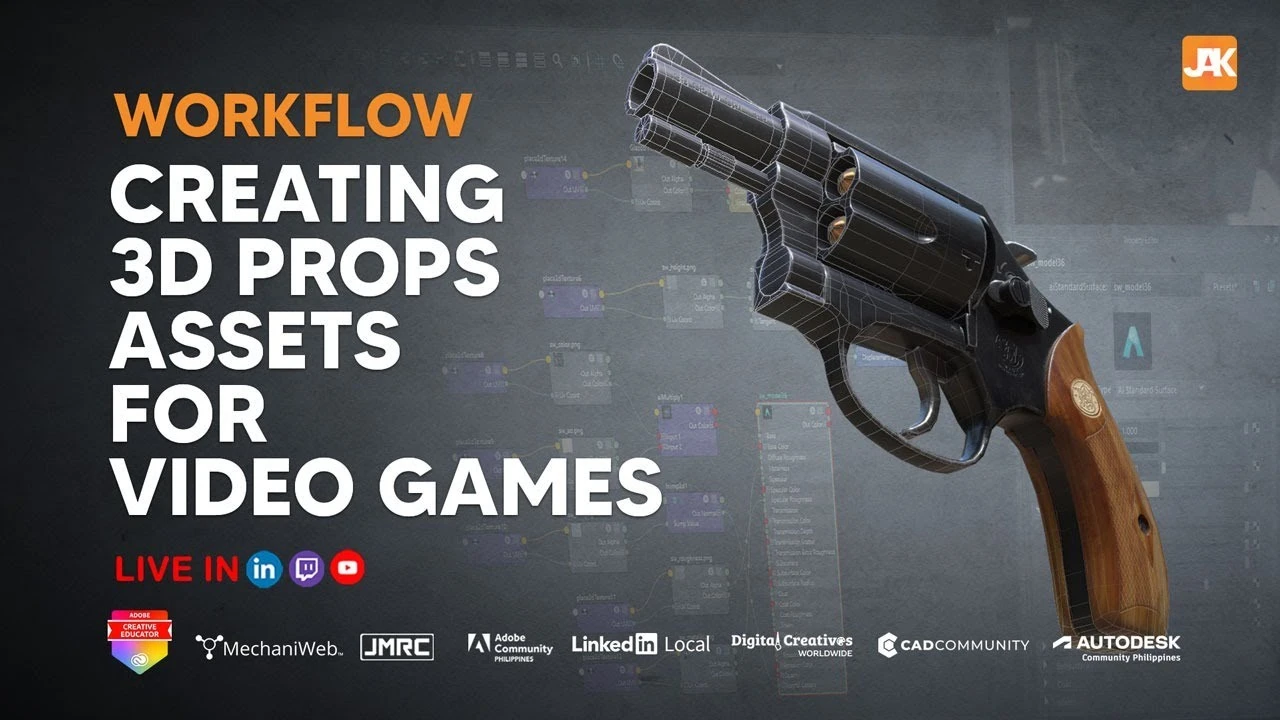
Workflow in Creating 3D Props for Games
Principiante🍅 Timer Pomodoro
Estudia 25 min, luego toma un descanso. ¡Mejora la concentración!
Descripción
In this webinar Ms. Jack Vicente will share her workflow in creating 3d props assets for games. A step by step guide will be shown on how she assess tasks and breakdown the approach in creating the model. The props to be demonstrated will be a weapon typically used in a shooting game.
She will be using the tools Autodesk Maya and Substance Painter for this project. This is open to all enthusiast that would like enter the gaming industry.
Learning Objectives:
assessing the task
research and development
blocking the scene
adding details
polishing the mesh
planning the uv
baking the model
texturing the mesh
rendering for beauty
testing the asset inside the game engine
Want a Certificate of Event Participation?
Register here:
https://forms.gle/dKN9SoHxU2kY7y1n9
Join our LinkedIn and Facebook group
/ cadcommunityasia
/ autodeskmayaphilippines
/ autodeskcommunityphilippines
/ 10404673
Join CAD Community Asia now.
https://cadcommunity.asia/
Download Maya here:
https://tinyurl.com/y4g7b2o8
Learn more about Maya here:
https://linkedin-learning.pxf.io/eYZL1
#autodeskmayausergroupphilippines
#cadcommunityasia
#autodeskcommunityphilippines
#autodeskeducationphilippines
#ambassadorhub
#servicetothecountry
#BIMPhilippines
#AutodeskPartner
She will be using the tools Autodesk Maya and Substance Painter for this project. This is open to all enthusiast that would like enter the gaming industry.
Learning Objectives:
assessing the task
research and development
blocking the scene
adding details
polishing the mesh
planning the uv
baking the model
texturing the mesh
rendering for beauty
testing the asset inside the game engine
Want a Certificate of Event Participation?
Register here:
https://forms.gle/dKN9SoHxU2kY7y1n9
Join our LinkedIn and Facebook group
/ cadcommunityasia
/ autodeskmayaphilippines
/ autodeskcommunityphilippines
/ 10404673
Join CAD Community Asia now.
https://cadcommunity.asia/
Download Maya here:
https://tinyurl.com/y4g7b2o8
Learn more about Maya here:
https://linkedin-learning.pxf.io/eYZL1
#autodeskmayausergroupphilippines
#cadcommunityasia
#autodeskcommunityphilippines
#autodeskeducationphilippines
#ambassadorhub
#servicetothecountry
#BIMPhilippines
#AutodeskPartner
A continuación


Transfer ALL Texture Maps - 3D Workflow and Optimization
Abe Leal 3D
Arnold Tutorial: How to create a portal effect using the ray_switch shader (GPU)
Arnold renderer
Arnold tutorial - Using transmission_scatter in MtoA
Arnold renderer
Arnold tutorial - Using the camera rolling shutter in MtoA
Arnold renderer
Master UV Mapping in Maya – Pro Tips for Perfect Unwraps
Abe Leal 3D
Arnold tutorial - Shading a mirror using MtoA
Arnold renderer
Cinematic Lighting Techniques Using Arnold / Maya
Arvid Schneider
The Secret Animation Workflow You Should Be Using
Sir Wade Neistadt
Intro to Dynamics in Maya 2019: nCloth (1/2)
Academic Phoenix Plus
Descubre los secretos del RenderSettings en MAYA Arnold Renderer | Parte 2 IMPERDIBLE
Blender Deluxe Tutoriales