¡Tiempo de descanso!
Tu sesión Pomodoro ha terminado
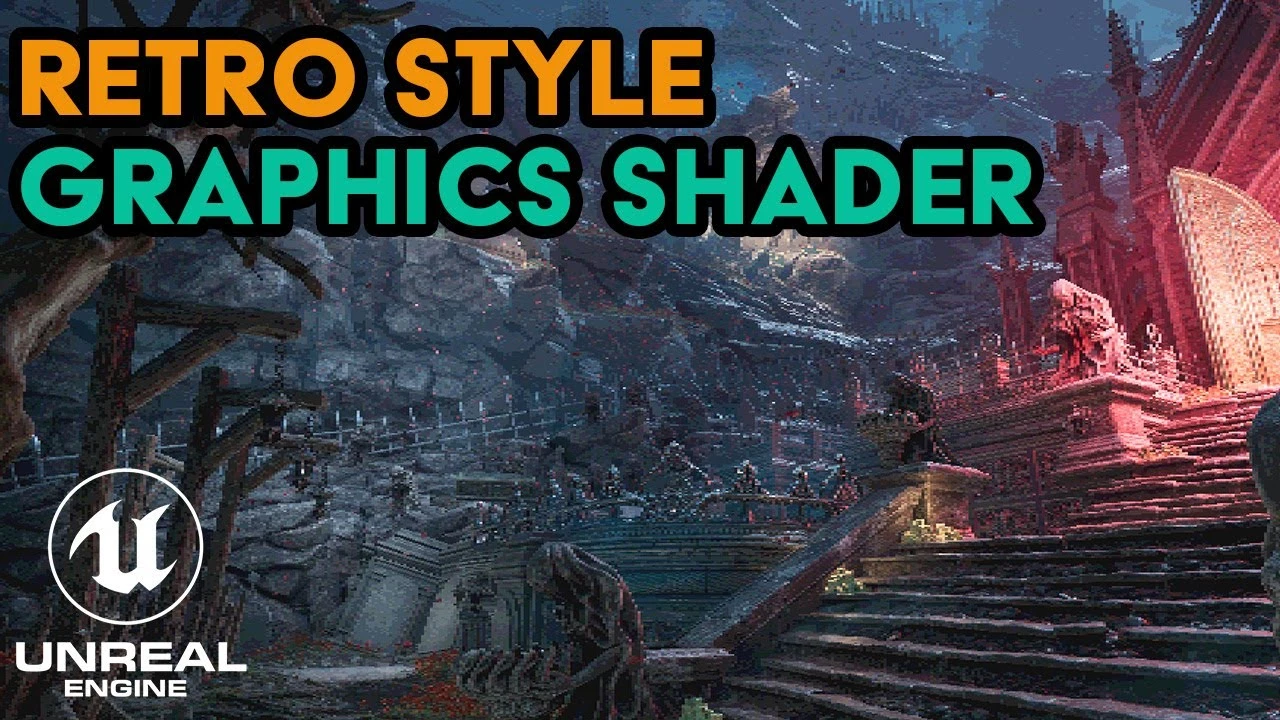
Unreal Engine 5 Retro Shader Tutorial | Pixelation & Color Posterization Post Processing Material
Principiante🍅 Timer Pomodoro
Estudia 25 min, luego toma un descanso. ¡Mejora la concentración!
Descripción
In this Unreal Engine 5 tutorial, learn how to create a retro-style shader with adjustable pixelation and color posterization effects using a post-processing material. This guide walks you through the entire process, step-by-step, so you can easily add retro visuals to your UE5 projects. Both the pixelation and color posterization effects are fully customizable, allowing you to tweak the intensity and style to suit your project’s aesthetic. Perfect for developers wanting to achieve a nostalgic, old-school game look!
What you'll learn:
How to create a pixelation effect in Unreal Engine 5.
How to add a color posterization/banding effect to your project.
Full control over pixelation and posterization through customizable material parameters.
Why use this shader? This shader is perfect for anyone looking to replicate the visual aesthetics of retro games from the 8-bit and 16-bit eras. Whether you're working on a retro-styled indie game or just exploring post-processing techniques in Unreal Engine 5, this tutorial will give you all the tools you need.
Chapters:
00:00 – Intro
00:27 – Pixelation Effect Tutorial
02:25 – Color Posterization Tutorial
05:16 – Outro
Don’t forget to like, comment, and subscribe for more Unreal Engine tutorials! Hit the bell icon for notifications on future videos.
#unrealengine5 #gamedevelopment #ShaderTutorial #pixelart #RetroShader
What you'll learn:
How to create a pixelation effect in Unreal Engine 5.
How to add a color posterization/banding effect to your project.
Full control over pixelation and posterization through customizable material parameters.
Why use this shader? This shader is perfect for anyone looking to replicate the visual aesthetics of retro games from the 8-bit and 16-bit eras. Whether you're working on a retro-styled indie game or just exploring post-processing techniques in Unreal Engine 5, this tutorial will give you all the tools you need.
Chapters:
00:00 – Intro
00:27 – Pixelation Effect Tutorial
02:25 – Color Posterization Tutorial
05:16 – Outro
Don’t forget to like, comment, and subscribe for more Unreal Engine tutorials! Hit the bell icon for notifications on future videos.
#unrealengine5 #gamedevelopment #ShaderTutorial #pixelart #RetroShader
A continuación

Create A Realistic Horror game Enviroment in UE5 (Horror Game Series Part 3)
Eremental Studios
Control Rig Physics: Fast, Fun, and Expressive Character Animation | Unreal Fest Stockholm 2025
Unreal Engine
You’re Probably Lighting Wrong: Physically Based Lighting in UE5 | Unreal Fest Gold Coast 2024
Unreal Engine
Applying Custom UI Graphics in UMG
Unreal Engine
Binding UMG Interface Elements to Blueprints
Unreal Engine
Aprende a dominar la iluminación en Unreal Engine 5 | Lumen, luces y optimización
AstroxDev
Capturing the World’s OLDEST Stave Church in Unreal Engine 5
William Faucher
Lighting Interiors in Unreal Engine 5
William Faucher
Introducing EasyAtmos for Unreal Engine 5
William Faucher
William Faucher Makes Unreal Engine 5.6 Even EASIER (Introducing EasyToolbag)
Future Familiar