Break time!
Your Pomodoro session has ended
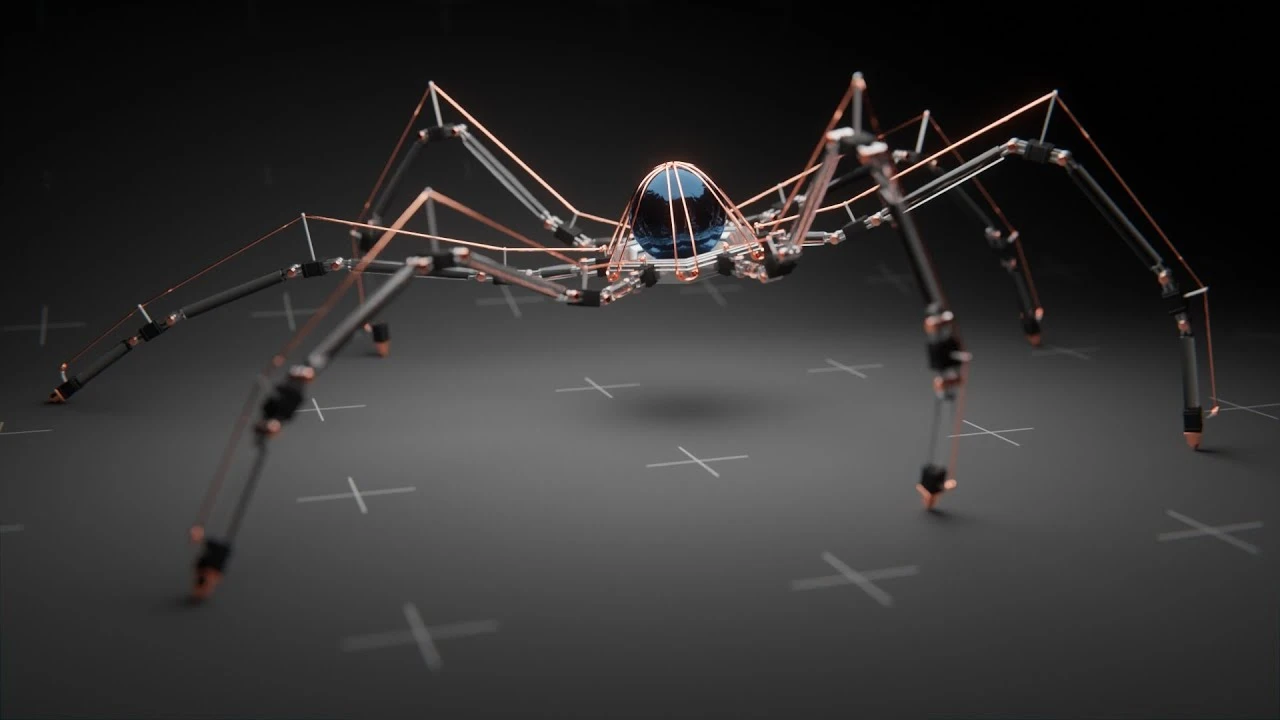
Tutorial: Making a Mechanical Walking Creature in Blender
Intermediate🍅 Pomodoro Timer
Study for 25 min, then take a break. Improves focus!
Description
Let's go through the entire process of modeling, rigging, animating and rendering a mechanical creature, in less than an hour!
Project file on Patreon: / 70374076
Discord server:
/ discord
Mentioned tutorials:
15 min Character Animation - • Animate a Character in 15 Minutes in Blender
Real Time Animation - • Tutorial: Real Time Animation in Blender
Robotic Arms (Part 2) - • Tutorial: Animating Robotic Arms in Blende...
Cinematic Lighting - • Tutorial: Cinematic Lighting in Blender
Software used:
Blender (Free and open source!) - https://blender.org
Assets used:
Ground texture (Creative Commons 0: Public domain) - https://i.imgur.com/soXtB7C.png
Follow me on instagram:
https://instagr.am/polyfjord
Thanks for watching!
00:00 What we'll be creating
00:34 Modeling a joint
05:59 Modeling the leg
09:04 Modeling the body
13:16 Modeling cable hooks
15:17 Making cables using curves
17:53 Assigning basic materials
19:43 Creating armature and IK rig
23:27 Attaching the leg to the rig
26:40 Tweaking the IK rig
29:35 Connecting the legs to the body
33:36 Animating the legs
37:44 Animating the body
39:47 Animating the ground
41:12 Shading and lighting setup
46:42 Making a vignette for the ground
48:00 Preview renders and post processing
50:16 Additional minor tweaks
52:35 Final result and cinematics
#opensource #modeling #creature
Music used:
(Affiliate links - Purchases made through the links below may provide compensation to Polyfjord).
Intro song - https://shutterstock.7eer.net/Ea6mGP
Outro song - https://shutterstock.7eer.net/Xxaboo
Project file on Patreon: / 70374076
Discord server:
/ discord
Mentioned tutorials:
15 min Character Animation - • Animate a Character in 15 Minutes in Blender
Real Time Animation - • Tutorial: Real Time Animation in Blender
Robotic Arms (Part 2) - • Tutorial: Animating Robotic Arms in Blende...
Cinematic Lighting - • Tutorial: Cinematic Lighting in Blender
Software used:
Blender (Free and open source!) - https://blender.org
Assets used:
Ground texture (Creative Commons 0: Public domain) - https://i.imgur.com/soXtB7C.png
Follow me on instagram:
https://instagr.am/polyfjord
Thanks for watching!
00:00 What we'll be creating
00:34 Modeling a joint
05:59 Modeling the leg
09:04 Modeling the body
13:16 Modeling cable hooks
15:17 Making cables using curves
17:53 Assigning basic materials
19:43 Creating armature and IK rig
23:27 Attaching the leg to the rig
26:40 Tweaking the IK rig
29:35 Connecting the legs to the body
33:36 Animating the legs
37:44 Animating the body
39:47 Animating the ground
41:12 Shading and lighting setup
46:42 Making a vignette for the ground
48:00 Preview renders and post processing
50:16 Additional minor tweaks
52:35 Final result and cinematics
#opensource #modeling #creature
Music used:
(Affiliate links - Purchases made through the links below may provide compensation to Polyfjord).
Intro song - https://shutterstock.7eer.net/Ea6mGP
Outro song - https://shutterstock.7eer.net/Xxaboo
Up Next






La IA acaba de llegar a Blender… pero no como imaginaba
Aura Prods
1 Easy Way to Make Better Environments in Blender
ManjuRam
Procedural Dark Leather Material (Blender Tutorial)
Ryan King Art
Easy Realistic Architecture And Environments In Blender - Beginner tutorial
AlternaVision Studio
Sculpting a cliff in Blender (timelapse)
Blender Guru
Easy Fog in Blender
Blender Guru
Mastering Sub-D and Low Poly 3D Modeling
On Mars 3D
How to make an abandoned house in Blender - Tutorial
Blender Guru
Create Realistic Mountains with Blender 5.0 and Gaea 2
Maarten Nauta
Blender 3.0 Beginner Tutorial Part 12: Floating Particles
Blender Guru