¡Tiempo de descanso!
Tu sesión Pomodoro ha terminado
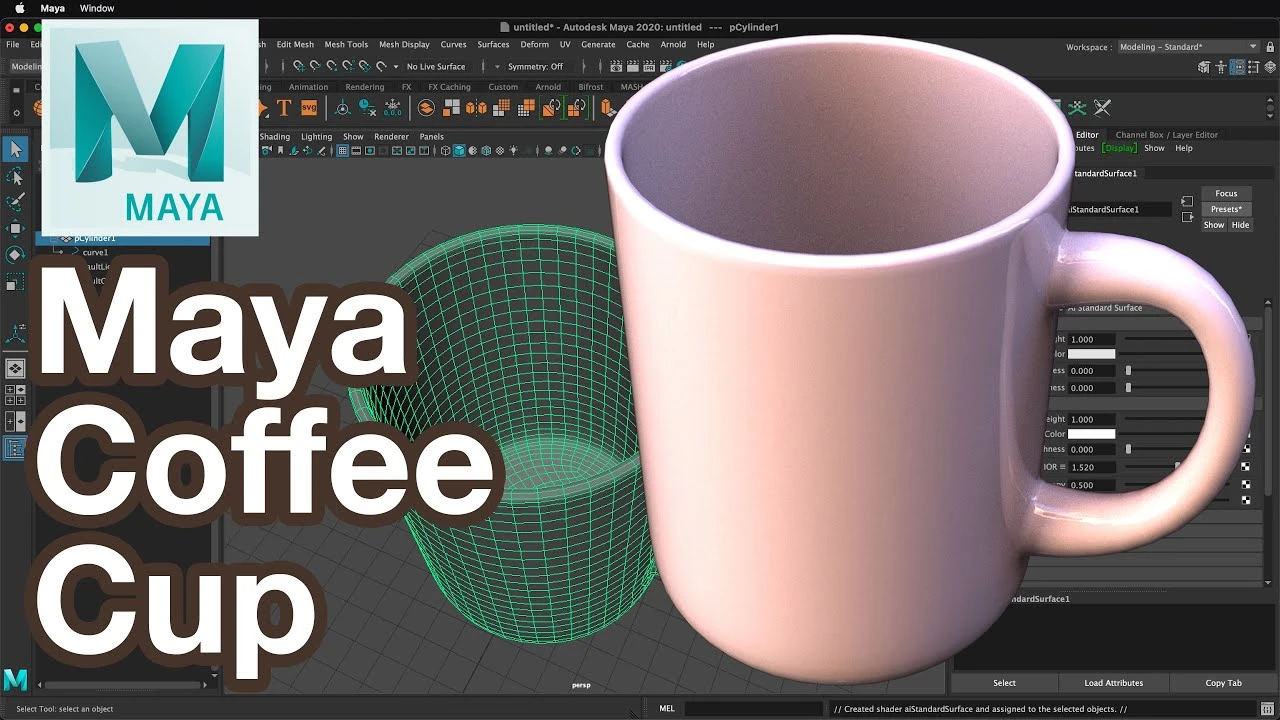
Maya Tutorial: Model a Coffee Cup
Principiante🍅 Timer Pomodoro
Estudia 25 min, luego toma un descanso. ¡Mejora la concentración!
Descripción
🌟 In this comprehensive Maya 3D tutorial, I'll guide you step-by-step on how to model a realistic coffee cup using polygon primitives. Perfect for beginners and those looking to sharpen their modeling skills!
🔹 What You'll Learn:
Selecting and modifying polygon cylinder primitives
Adjusting attributes like radius, height, and subdivisions
Techniques for smoothing, extruding, and adding thickness to your model
Creating a realistic handle using the bridge command and adjusting curves
Finalizing with a professional touch by adding materials
🛠️ Key Tools and Commands:
Polygon Cylinder Primitive
Attribute Editor for customizing dimensions
Extrude (Ctrl+E / Command+E)
Multi-Cut Tool for precision editing
Smooth and Object Mode for refining the model
Adding Edge Loops for detailed shaping
🎨 Final Touches:
Assigning materials for a realistic look
Preparing your model for import into various scenes
💡 Tips and Tricks:
Learn how to work with quads for easier manipulation
Discover shortcuts for faster modeling
Understand how to use Maya's powerful tools for creating complex shapes
🎓 Who is This Tutorial For?
Beginners in 3D modeling
Maya users looking to enhance their skills
Digital artists and animators interested in realistic object modeling
📌 Don't Forget:
Like, Share, and Subscribe for more 3D modeling tutorials!
Drop your questions or suggestions in the comments below.
🔔 Stay Connected:
Subscribe for more tutorials: [Your Channel Link]
Follow us on [Social Media Links]
Visit our website for exclusive content: [Your Website]
Happy 3D Modeling! 🌟
Quickly model a coffee cup from a cylinder in Autodesk Maya. Make the bottom of the cup have quads and use the bridge command to create a handle. Alter the curve of the handle.
👍 Support on Patreon
/ whatmakeart
🟥 Subscribe
https://www.youtube.com/
Links
🌐 What? Make Art Online
https://whatmakeart.com/
👕🎽Looking for What? Make Art merch?
https://teespring.com/stores/what-mak...
📷 What? Make Art on Instagram:
/ whatmakeart
🐦 What? Make Art on Twitter:
/ whatmakeart
My Work:
🌐 https://www.jimmykuehnle.com/
▶️Videos:
/ jimmykuehnle
#maya #mayatutorial #3dmodeling
🔹 What You'll Learn:
Selecting and modifying polygon cylinder primitives
Adjusting attributes like radius, height, and subdivisions
Techniques for smoothing, extruding, and adding thickness to your model
Creating a realistic handle using the bridge command and adjusting curves
Finalizing with a professional touch by adding materials
🛠️ Key Tools and Commands:
Polygon Cylinder Primitive
Attribute Editor for customizing dimensions
Extrude (Ctrl+E / Command+E)
Multi-Cut Tool for precision editing
Smooth and Object Mode for refining the model
Adding Edge Loops for detailed shaping
🎨 Final Touches:
Assigning materials for a realistic look
Preparing your model for import into various scenes
💡 Tips and Tricks:
Learn how to work with quads for easier manipulation
Discover shortcuts for faster modeling
Understand how to use Maya's powerful tools for creating complex shapes
🎓 Who is This Tutorial For?
Beginners in 3D modeling
Maya users looking to enhance their skills
Digital artists and animators interested in realistic object modeling
📌 Don't Forget:
Like, Share, and Subscribe for more 3D modeling tutorials!
Drop your questions or suggestions in the comments below.
🔔 Stay Connected:
Subscribe for more tutorials: [Your Channel Link]
Follow us on [Social Media Links]
Visit our website for exclusive content: [Your Website]
Happy 3D Modeling! 🌟
Quickly model a coffee cup from a cylinder in Autodesk Maya. Make the bottom of the cup have quads and use the bridge command to create a handle. Alter the curve of the handle.
👍 Support on Patreon
/ whatmakeart
🟥 Subscribe
https://www.youtube.com/
Links
🌐 What? Make Art Online
https://whatmakeart.com/
👕🎽Looking for What? Make Art merch?
https://teespring.com/stores/what-mak...
📷 What? Make Art on Instagram:
/ whatmakeart
🐦 What? Make Art on Twitter:
/ whatmakeart
My Work:
🌐 https://www.jimmykuehnle.com/
▶️Videos:
/ jimmykuehnle
#maya #mayatutorial #3dmodeling
A continuación
nParticles Instancer Maya tutorial ataque de aviones #maya #mayatutorial #mayatutorials #nparticles
Blender Deluxe Tutoriales
¡Crea este Diorama Realista! Tutorial de UVs en Maya y Texturizado en Substance Painter
Blender Deluxe Tutoriales
How to Easily Translate a Walk Cycle Forward | Maya Animation Tip
Mark Masters
Maya Tutorial | 5 Easy steps for Clean UVs!
Abe Leal 3D
¡Descubre cómo transformar tus escenas en Arnold Maya con aiAtmosphereVolume! 🌟
Blender Deluxe Tutoriales
3D Game Asset Creation (Full Process) - Stylised Axe
Stu Lloyd (CG Stu)
Arnold Tutorial - How to use the toon tonemap hue saturation
Arnold renderer
Arnold Tutorial - Snow and ice scene using the Distance shader
Arnold renderer
How to Quick Rig a Character with Controllers? | Lesson10PartA | Maya Animation for Beginners | Live
zinteractive
Arnold Tutorial - Using the mesh_light in MtoA
Arnold renderer