¡Tiempo de descanso!
Tu sesión Pomodoro ha terminado
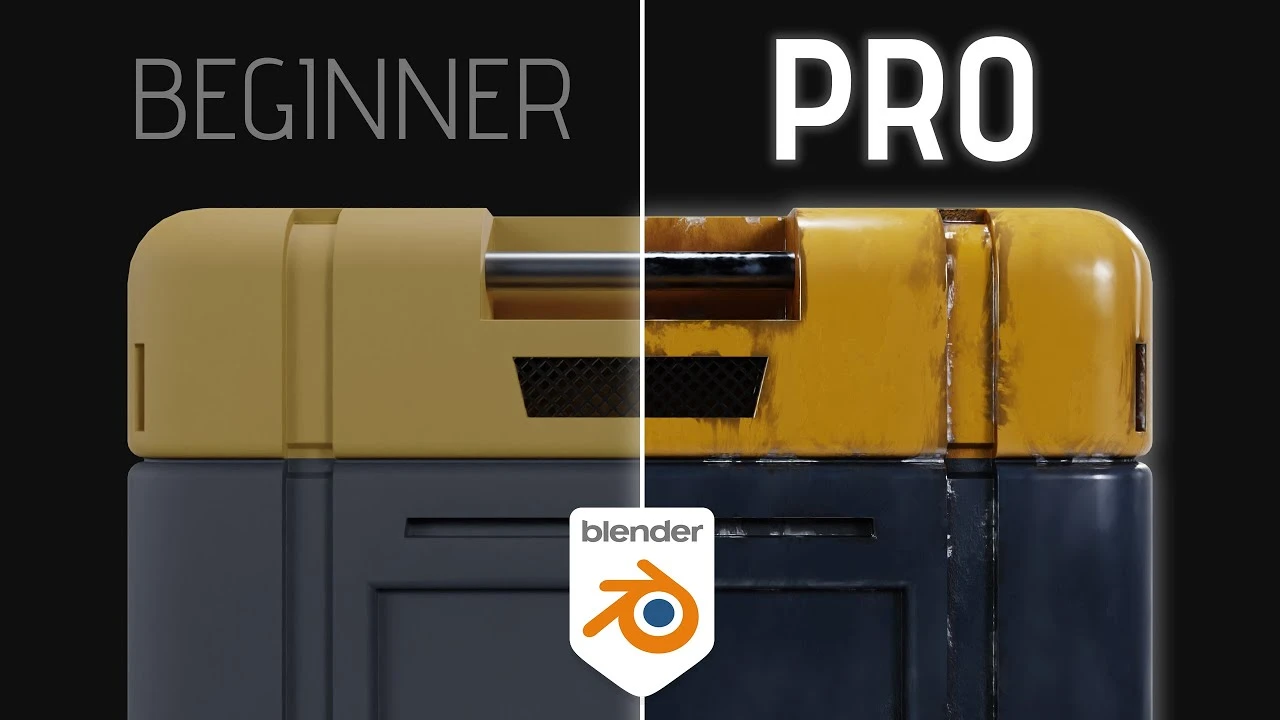
How to Create Professional Materials
Principiante🍅 Timer Pomodoro
Estudia 25 min, luego toma un descanso. ¡Mejora la concentración!
Descripción
In this video I'll show you how to create smart materials in Blender! This will help you take your shading skills to the next level.
🆓 FREE Sci-Fi Crate model; https://bit.ly/3z7Keuj 🆓
#b3d #blender3d #kaizentutorials
-----------------------------------------------------------------------------------------
⛩️ Join the Patreon to support the channel; / kaizentutorials ⛩️
-----------------------------------------------------------------------------------------
My FREE 3D models: https://than.gs/u/1157780
Join the Kaizen Discord: / discord
-----------------------------------------------------------------------------------------
➕ Addons You Need:
Fractal Machine - https://bit.ly/bnfractal
Sanctus Material Library - https://bit.ly/3TWhKMe
Botaniq Foliage Library - https://bit.ly/BotaniqKaizen
Physical Celestial Objects - https://bit.ly/PCOkaizen
Physical Starlight Atmosphere - https://bit.ly/PSAkaizen
Gobos Light Textures - https://bit.ly/Gobos
-----------------------------------------------------------------------------------------
📚 My Favorite Blender Courses:
Blender Launch Pad - https://bit.ly/BlenderLaunchPad
Hard Surface Game Asset Course - https://bit.ly/HardsurfaceBlenderBros
Cubic Worlds - https://bit.ly/cubicworlds
Master 3D Sculpting in Blender - https://bit.ly/3VLxwtW
Intro to Motion Graphics - https://bit.ly/MotionGraphicsDucky
The Art of Effective Rigging - https://bit.ly/3XbwfxE
Alive! Animation Course in Blender - https://bit.ly/3XbwfxE
Master 3D Sculpting in Blender - https://bit.ly/3VLxwtW
Master 3D Environments in Blender - https://bit.ly/MasterEnvironments
-----------------------------------------------------------------------------------------
Chapters:
00:00 Intro
00:22 Starting the Basecolor
02:20 Creating a Curvature Map
03:24 Setting up an Edge Mask
04:37 Creating an Ambient Occlusion mask
05:31 Setting up our Smart Material Basecolor
07:25 The finished Basecolor setup
07:41 Adding our Metalness map
08:03 Setting up the Roughness map
09:55 The final value - Normal map
10:31 Why is this a 'Smart Material'?
11:00 Outro
-----------------------------------------------------------------------------------------
🗣️ Socials:
Insta - @Kaizentutorials
Twitter - @kaizentutorials
-----------------------------------------------------------------------------------------
🎶 Music:
Epidemic Sound
https://share.epidemicsound.com/73h5ua
-----------------------------------------------------------------------------------------
Some links are affiliate links on which I receive a kickback
🆓 FREE Sci-Fi Crate model; https://bit.ly/3z7Keuj 🆓
#b3d #blender3d #kaizentutorials
-----------------------------------------------------------------------------------------
⛩️ Join the Patreon to support the channel; / kaizentutorials ⛩️
-----------------------------------------------------------------------------------------
My FREE 3D models: https://than.gs/u/1157780
Join the Kaizen Discord: / discord
-----------------------------------------------------------------------------------------
➕ Addons You Need:
Fractal Machine - https://bit.ly/bnfractal
Sanctus Material Library - https://bit.ly/3TWhKMe
Botaniq Foliage Library - https://bit.ly/BotaniqKaizen
Physical Celestial Objects - https://bit.ly/PCOkaizen
Physical Starlight Atmosphere - https://bit.ly/PSAkaizen
Gobos Light Textures - https://bit.ly/Gobos
-----------------------------------------------------------------------------------------
📚 My Favorite Blender Courses:
Blender Launch Pad - https://bit.ly/BlenderLaunchPad
Hard Surface Game Asset Course - https://bit.ly/HardsurfaceBlenderBros
Cubic Worlds - https://bit.ly/cubicworlds
Master 3D Sculpting in Blender - https://bit.ly/3VLxwtW
Intro to Motion Graphics - https://bit.ly/MotionGraphicsDucky
The Art of Effective Rigging - https://bit.ly/3XbwfxE
Alive! Animation Course in Blender - https://bit.ly/3XbwfxE
Master 3D Sculpting in Blender - https://bit.ly/3VLxwtW
Master 3D Environments in Blender - https://bit.ly/MasterEnvironments
-----------------------------------------------------------------------------------------
Chapters:
00:00 Intro
00:22 Starting the Basecolor
02:20 Creating a Curvature Map
03:24 Setting up an Edge Mask
04:37 Creating an Ambient Occlusion mask
05:31 Setting up our Smart Material Basecolor
07:25 The finished Basecolor setup
07:41 Adding our Metalness map
08:03 Setting up the Roughness map
09:55 The final value - Normal map
10:31 Why is this a 'Smart Material'?
11:00 Outro
-----------------------------------------------------------------------------------------
🗣️ Socials:
Insta - @Kaizentutorials
Twitter - @kaizentutorials
-----------------------------------------------------------------------------------------
🎶 Music:
Epidemic Sound
https://share.epidemicsound.com/73h5ua
-----------------------------------------------------------------------------------------
Some links are affiliate links on which I receive a kickback
A continuación






La IA acaba de llegar a Blender… pero no como imaginaba
Aura Prods
1 Easy Way to Make Better Environments in Blender
ManjuRam
Realtime CAR DESTRUCTION - Blender vfx Tutorial
Raffo VFX
Sculpting a cliff in Blender (timelapse)
Blender Guru
advanced destruction effects in blender
FxForge
Easy Fog in Blender
Blender Guru
Realistic house destruction in blender
FxForge
Finally: Texture Painting in Blender Made Simple
rileyb3d
3D Hair Brush Tutorial - Practical Tutorial on Particle Hair - Bison Hair Styling
VFX Grace
Designing a Futuristic Street View in Blender
Markom3D