¡Tiempo de descanso!
Tu sesión Pomodoro ha terminado
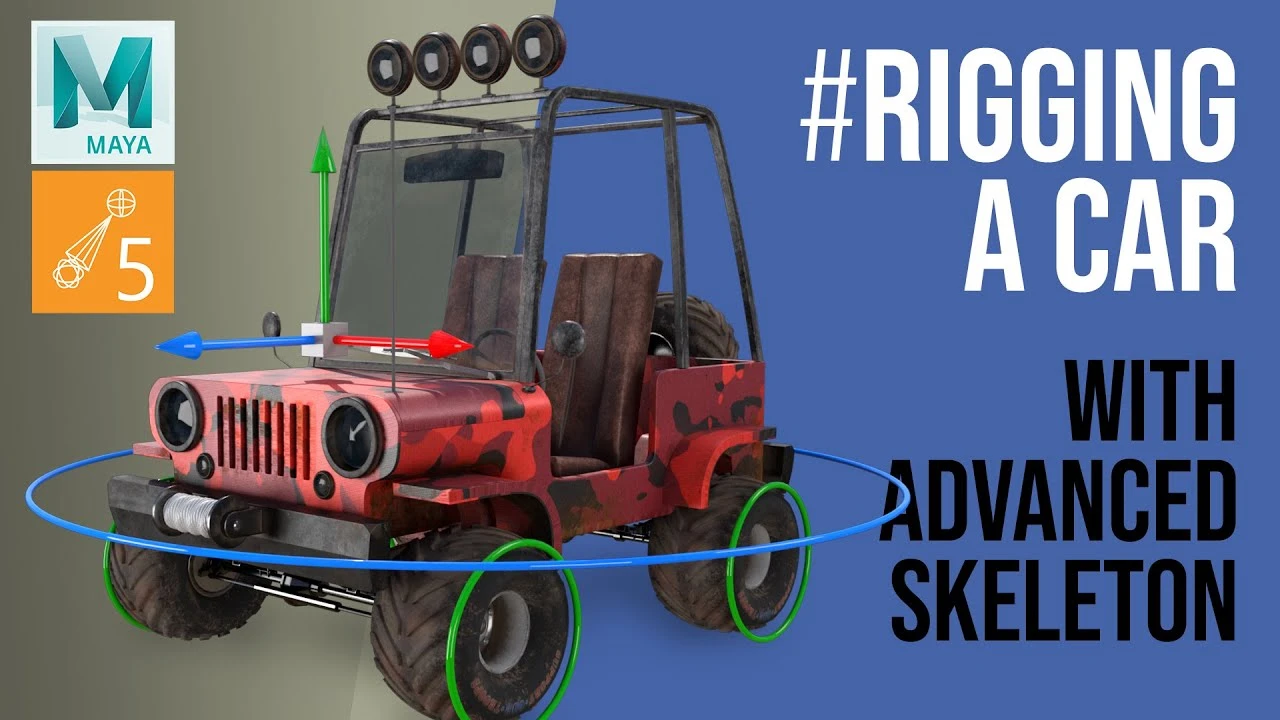
EASILY Rig a Car in Maya - with Advanced Skeleton Vehicle Rigging
Principiante🍅 Timer Pomodoro
Estudia 25 min, luego toma un descanso. ¡Mejora la concentración!
Descripción
👉 Today we learn how to easily rig a car in Maya with Advanced skeleton rigging tools. It's my favourite rigging tool, enabling animators to create quality rigs for themselves. Maya Vehicle rigging can be simple and leave us to great car animation!
I will go through simple set-up, placing joints and using the template, and some important settings needed. We will easily rig the wheels with auto roll. And then add cool bouncy dynamics to the car body chassis and antenna.
Towards the end of the video I go over my own method of setting up a steering system to make animation easier. We create set driven keys turning both wheels and the steering wheel all under one single animatable attribute
Advanced Skeleton for Autodesk Maya is completely Free for Non-commercial use, and an affordable freelancer license is available for commercial projects.
👉 Get it here https://www.animationstudios.com.au/
🔥 Support this channel and get rewards at: 👉 / animatorartistlife
📗 To jump to a specific part of the video you can skip to any chapter by clicking in the timeline
▬ Contents of this video ▬▬▬▬▬▬▬▬▬▬
0:00 - Introduction
00:27 - 01 - Model setup
00:59 - 02 - Placing our own joints method
11:44 - 03 - Template method
16:49 - 04 - Antenna
23:34 - 05 - Bind geometry
33:03 - 06 - Adding dynamics
38:32 - 07 - Steering system
▬▬▬▬▬▬▬▬▬▬
👉 To see a series on rigging a full character with advanced skeleton go here: • Character Rigging in Maya with Advanced Sk...
Thanks for watching, more FREE lessons coming each month!
Please leave a like if you got value from this free tutorial, and comment below if you made your own motion design animations or anything else you would like to see in future videos
🔥 GET VIP REWARDS & BENEFITS and even my DIGITAL ASSETS LIKE 3D MODELS! for supporting this channel for as little as $2 a month. VISIT: 👉 / animatorartistlife . 👈 I want to be able to dedicate more time and make more videos each month so any support is hugely appreciated 🙏
👉 Come Join the New Private Facebook group: / animatorartistlife
👉 Follow on Twitter: / animartistlife
I will go through simple set-up, placing joints and using the template, and some important settings needed. We will easily rig the wheels with auto roll. And then add cool bouncy dynamics to the car body chassis and antenna.
Towards the end of the video I go over my own method of setting up a steering system to make animation easier. We create set driven keys turning both wheels and the steering wheel all under one single animatable attribute
Advanced Skeleton for Autodesk Maya is completely Free for Non-commercial use, and an affordable freelancer license is available for commercial projects.
👉 Get it here https://www.animationstudios.com.au/
🔥 Support this channel and get rewards at: 👉 / animatorartistlife
📗 To jump to a specific part of the video you can skip to any chapter by clicking in the timeline
▬ Contents of this video ▬▬▬▬▬▬▬▬▬▬
0:00 - Introduction
00:27 - 01 - Model setup
00:59 - 02 - Placing our own joints method
11:44 - 03 - Template method
16:49 - 04 - Antenna
23:34 - 05 - Bind geometry
33:03 - 06 - Adding dynamics
38:32 - 07 - Steering system
▬▬▬▬▬▬▬▬▬▬
👉 To see a series on rigging a full character with advanced skeleton go here: • Character Rigging in Maya with Advanced Sk...
Thanks for watching, more FREE lessons coming each month!
Please leave a like if you got value from this free tutorial, and comment below if you made your own motion design animations or anything else you would like to see in future videos
🔥 GET VIP REWARDS & BENEFITS and even my DIGITAL ASSETS LIKE 3D MODELS! for supporting this channel for as little as $2 a month. VISIT: 👉 / animatorartistlife . 👈 I want to be able to dedicate more time and make more videos each month so any support is hugely appreciated 🙏
👉 Come Join the New Private Facebook group: / animatorartistlife
👉 Follow on Twitter: / animartistlife
A continuación



How to Animate Anticipation & Overshoot in Maya? | Lesson5PartA | Maya Animation for Beginners |Live
zinteractive
Cinematic Lighting Techniques Using Arnold / Maya
Arvid Schneider
Introduction to XGen - Quick Start Guide
FlippedNormals
Modelado y Texturizado de Lavamanos para VideoJuego Maya Substance Painter ⭐ ⭐ ⭐ ⭐ ⭐
Blender Deluxe Tutoriales
Arnold tutorial - Using the camera rolling shutter in MtoA
Arnold renderer
Arnold tutorial - Paint with light in MtoA
Arnold renderer
Candle Flame Tutorial in Maya
Creatively3d
Arnold for Maya | How to create Silk, Cotton, Velvet and other fabric shaders | Tutorial #115
MographPlus
How to Use The Modeling Tools in Maya
FlippedNormals
Rigging brazo IKFK Parte 3
Blender Deluxe Tutoriales