Break time!
Your Pomodoro session has ended
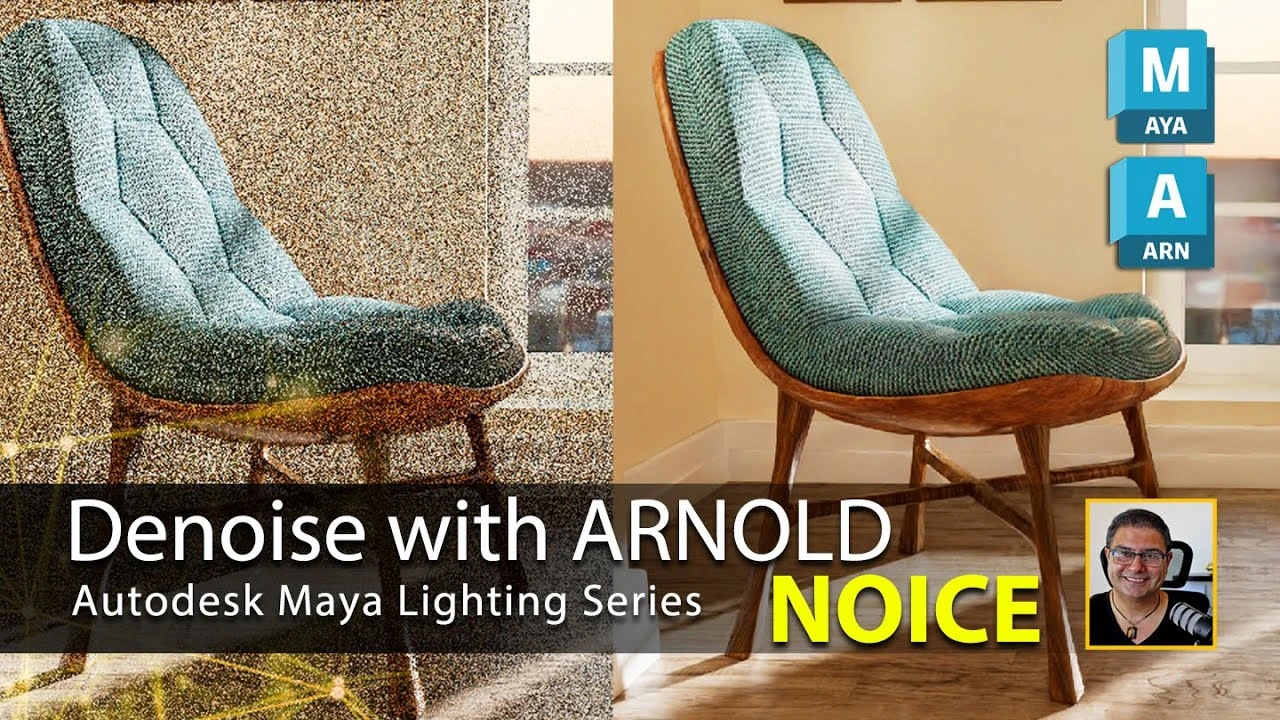
Denoise with Arnold (NOICE) in Maya
Beginner🍅 Pomodoro Timer
Study for 25 min, then take a break. Improves focus!
Description
The scene file can be accessed via https://www.patreon.com/posts/denoise...
Check out my Maya Lighting playlist via: • Maya Lighting Series
You can access our shop via: / @sarkamari
Follow me on:
https://x.com/@Sarkamari1
/ sarkamari.cg
/ sarkamari
The Arnold Denoiser is a stand-alone application. It works on EXR-merged AOV files and outputs an EXR file with the denoised layers. It takes into account multiple frames and multiple light AOVs. Like most denoisers, it considers a neighborhood around the current pixel and looks for similar neighborhoods inside a given search area to blend together. To use the Arnold Denoiser, you will need to render images via the Arnold EXR driver.
Bookmarks:
00:00 Let's Get Started
01:04 Scene Prep
02:52 Do We Need NOICE?
05:21 Applying NOICE
12:13 Comparing Results
#sarkamari @sarkamari @Autodesk
Music by: Chill Summer Vlog | No Copyright Music
Check out my Maya Lighting playlist via: • Maya Lighting Series
You can access our shop via: / @sarkamari
Follow me on:
https://x.com/@Sarkamari1
/ sarkamari.cg
/ sarkamari
The Arnold Denoiser is a stand-alone application. It works on EXR-merged AOV files and outputs an EXR file with the denoised layers. It takes into account multiple frames and multiple light AOVs. Like most denoisers, it considers a neighborhood around the current pixel and looks for similar neighborhoods inside a given search area to blend together. To use the Arnold Denoiser, you will need to render images via the Arnold EXR driver.
Bookmarks:
00:00 Let's Get Started
01:04 Scene Prep
02:52 Do We Need NOICE?
05:21 Applying NOICE
12:13 Comparing Results
#sarkamari @sarkamari @Autodesk
Music by: Chill Summer Vlog | No Copyright Music
Up Next
Arnold tutorial - Toon hatching shading in MtoA
Arnold renderer
Rigging brazo IKFK Parte 3
Blender Deluxe Tutoriales
Arnold Tutorial - Mesh Light with Motion Blur in Maya (GPU)
Arnold renderer
¿Cómo animar la anticipación y el sobreimpulso en Maya? | Lección 5, Parte C | Animación en Maya ...
zinteractive
Arnold Tutorial: Toon shading an assault mech model in MtoA
Arnold renderer
Arnold tutorial - Using the curvature shader in MtoA
Arnold renderer
Arnold tutorial - Using the flakes shader in MtoA
Arnold renderer
Arnold Tutorial - How to shade origami paper in Maya
Arnold renderer
Arnold tutorial - Using the round_corners shader in MtoA
Arnold renderer
Modelado Pote Bowl Ceramico Maya
Blender Deluxe Tutoriales