¡Tiempo de descanso!
Tu sesión Pomodoro ha terminado
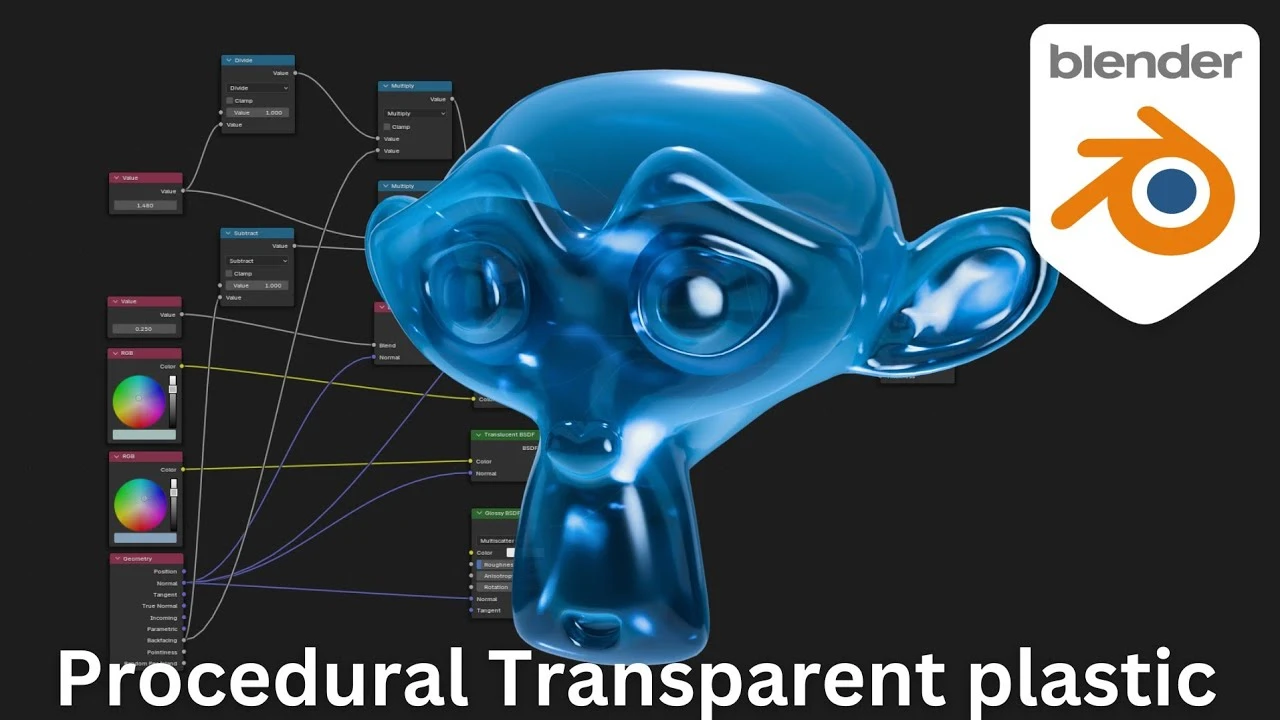
Creating Realistic Transparent Plastic in Blender – 100% Procedural Node Setup!
Principiante🍅 Timer Pomodoro
Estudia 25 min, luego toma un descanso. ¡Mejora la concentración!
Descripción
In this Blender tutorial, I’ll show you how to create a stunning, realistic transparent plastic material using a fully procedural node setup—no textures required! Whether you’re a beginner or an experienced artist, this step-by-step guide will help you achieve professional-quality results that are easy to customize. Perfect for anyone working on product renders, animations, or even game assets, this setup is both flexible and efficient. Tune in to learn how to bring your Blender projects to life with this versatile transparent plastic material!
A continuación





La IA acaba de llegar a Blender… pero no como imaginaba
Aura Prods
1 Easy Way to Make Better Environments in Blender
ManjuRam
Sculpting a cliff in Blender (timelapse)
Blender Guru
How I created a barren world in Blender 3D
Samuel Krug VFX
Easy Fog in Blender
Blender Guru
Aprende TODO de Blender - De CERO a PRO de Producto 3D! 📈📈 (Tutorial ESP) - Blender 4.2.2 LTS
Alinwan Studios
How to Make Cinematic Renders with Blender?
Bad Normals
Material de vidrio en Blender 4.3: ¡Rápido y fácil!
Berk Kaplan - Designer
Blender 3.0 Beginner Tutorial Part 12: Floating Particles
Blender Guru
Topology Tip: Perfect Sub-D Modeling Every Time!
On Mars 3D