Break time!
Your Pomodoro session has ended
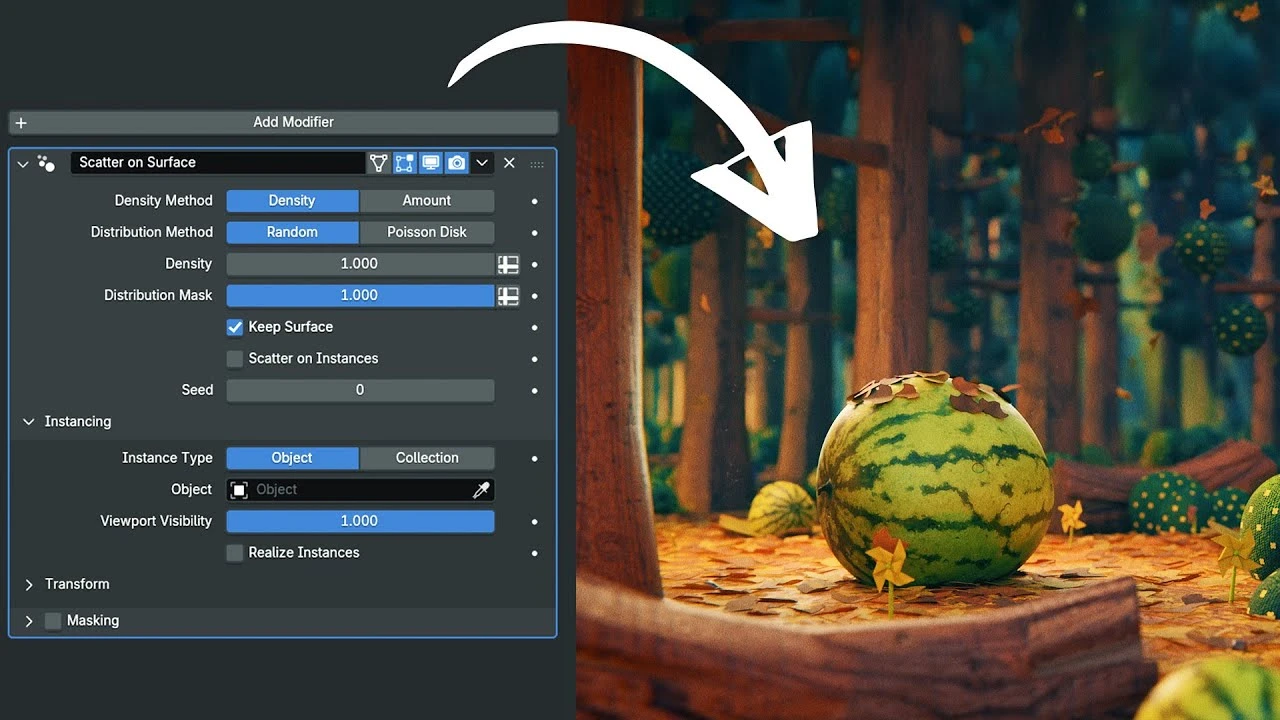
Blender 5.0 Just Made Creating Environments WAY Easier (New Tools!)
Beginner🍅 Pomodoro Timer
Study for 25 min, then take a break. Improves focus!
Description
Thanks to Storyblocks for sponsoring this video! Download unlimited stock media at one set price with Storyblocks: http://storyblocks.com/SouthernShotty
25% OFF ALL PRODUCTS ON SUPERHIVE WITH THE CODE: blender5
Free Tutorial Files Here: https://southernshotty.gumroad.com/l/...
👇My Products (affiliate links)👇
NEW MOGRAPH TOOLBOX: https://superhivemarket.com/products/...
Dynamic VFX Pack (Free Sample Pack): https://blendermarket.com/products/bl...
Crafty Asset Pack (Free Sample Pack): https://blendermarket.com/products/cr...
Patreon: / southernshotty
Skillshare: https://www.skillshare.com/r/user/sou...
-----------------------------------------------------------------------------------------------------------
Tag me in your artwork on Instagram and Twitter @SouthernShotty
Instagram: / southernshotty
Twitter: / southernshotty
-----------------------------------------------------------------------------------------------------------
Geometry Nodes 5.0 massively speeds up environment creation—perfect for stylized dioramas, cozy scenes, game-ready level art, and cinematic world-building. Whether you’re a beginner or a pro, these tools will save you HOURS.
—
🛠️ Tools & Versions
• Blender 5.0 (Stable or Beta)
• ACES Color Management (optional but recommended)
• Eevee & Cycles tested
00:00 – Geo Nodes Just Got Way More Beginner-Friendly
00:27 – A Grass System in Just a Few Clicks
01:50 – Use This for Full Artistic Control
03:00 – Turn Any Image Into a 3D Mesh
04:25 – The Node Trick That Makes Plants Pop
06:13 – Now This Feels Like Stylized Worldbuilding
08:35 – The New Array Workflow Is Shockingly Powerful
11:14 – The Tool That Finally Makes Curves Easy
12:04 – A Modular System You Can Actually Reuse
13:32 – The Modifier That Adds Instant Polish
14:12 – UVs, Round Caps, and Other Painkillers
15:18 – Bonus Tips for Building Beautiful Environments
25% OFF ALL PRODUCTS ON SUPERHIVE WITH THE CODE: blender5
Free Tutorial Files Here: https://southernshotty.gumroad.com/l/...
👇My Products (affiliate links)👇
NEW MOGRAPH TOOLBOX: https://superhivemarket.com/products/...
Dynamic VFX Pack (Free Sample Pack): https://blendermarket.com/products/bl...
Crafty Asset Pack (Free Sample Pack): https://blendermarket.com/products/cr...
Patreon: / southernshotty
Skillshare: https://www.skillshare.com/r/user/sou...
-----------------------------------------------------------------------------------------------------------
Tag me in your artwork on Instagram and Twitter @SouthernShotty
Instagram: / southernshotty
Twitter: / southernshotty
-----------------------------------------------------------------------------------------------------------
Geometry Nodes 5.0 massively speeds up environment creation—perfect for stylized dioramas, cozy scenes, game-ready level art, and cinematic world-building. Whether you’re a beginner or a pro, these tools will save you HOURS.
—
🛠️ Tools & Versions
• Blender 5.0 (Stable or Beta)
• ACES Color Management (optional but recommended)
• Eevee & Cycles tested
00:00 – Geo Nodes Just Got Way More Beginner-Friendly
00:27 – A Grass System in Just a Few Clicks
01:50 – Use This for Full Artistic Control
03:00 – Turn Any Image Into a 3D Mesh
04:25 – The Node Trick That Makes Plants Pop
06:13 – Now This Feels Like Stylized Worldbuilding
08:35 – The New Array Workflow Is Shockingly Powerful
11:14 – The Tool That Finally Makes Curves Easy
12:04 – A Modular System You Can Actually Reuse
13:32 – The Modifier That Adds Instant Polish
14:12 – UVs, Round Caps, and Other Painkillers
15:18 – Bonus Tips for Building Beautiful Environments
Up Next






La IA acaba de llegar a Blender… pero no como imaginaba
Aura Prods
Hand keyed cloth animation in Blender
Pierrick Picaut
Realistic Materials Are Easy In Blender
DECODED
1 Easy Way to Make Better Environments in Blender
ManjuRam
Sculpting a cliff in Blender (timelapse)
Blender Guru
Easy Fog in Blender
Blender Guru
Destroy Anything with Particles in Blender - Iridesium
Iridesium
Create Custom Buildings in Blender - Lazy Tutorials
IanHubert
5 Tips for FASTER Renders in Blender Cycles
Kaizen
Making Couch Cushion Seats (Part 4)
Blender Guru