Break time!
Your Pomodoro session has ended
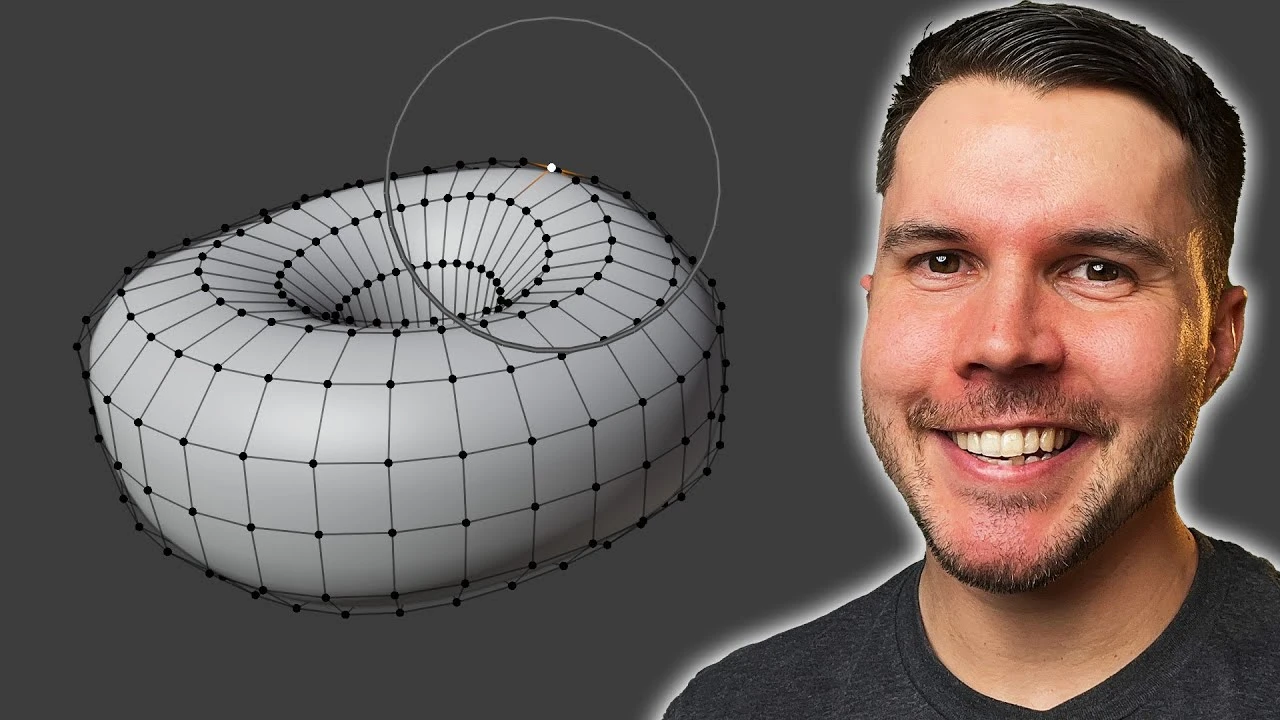
Beginner Blender 4.0 Tutorial - Part 2: Basic Modelling
Beginner🍅 Pomodoro Timer
Study for 25 min, then take a break. Improves focus!
Description
This is now outdated! Watch the NEW donut tutorial, remade for Blender 5.0: https://www.youtube.com/watch?v=-tbSCMbJA6o
Let's start making and shaping that donut 🍩 Part 3: https://www.youtube.com/watch?v=AqJx5TJyhes&list=PLjEaoINr3zgEPv5y--4MKpciLaoQYZB1Z&index=3
In this video you'll learn about adding and changing object parameters, altering the shape of a mesh, proportional editing and the subdivision modifiers.
===Links🔗===
Keyboard Shortcut Cheat Sheet: https://docs.google.com/document/d/1zPBgZAdftWa6WVa7UIFUqW_7EcqOYE0X743RqFuJL3o/edit?usp=sharing
Industry Compatible Cheat Sheet (not mine, used with permission): https://drive.google.com/file/d/1drO8P6tyz9DaKNGKki2PrIBGpYwIFzU0/view?usp=drive_link
Blender Guru Discord: https://blenderguru.com/discord
Blender Guru: http://www.blenderguru.com
Poliigon: https://www.poliigon.com/?utm_campaign=desc&utm_source=youtube&utm_medium=bg
=== Chapter Marks ✂️===
0:00 Adding the Torus
3:41 Smooth shading
4:34 Subdivision modifier
9:01 Editing an object
11:46 Proportional editing
13:37 Deforming the donut
15:04 Shrinking the circumference
17:00 Saving your file
17:35 Join the Discord
===Follow me🫰===
Twitter: https://twitter.com/andrewpprice
Instagram: http://instagram.com/andrewpprice
ArtStation: http://artstation.com/artist/andrewprice
LinkedIn: www.linkedin.com/in/andrew-price-17678911
Let's start making and shaping that donut 🍩 Part 3: https://www.youtube.com/watch?v=AqJx5TJyhes&list=PLjEaoINr3zgEPv5y--4MKpciLaoQYZB1Z&index=3
In this video you'll learn about adding and changing object parameters, altering the shape of a mesh, proportional editing and the subdivision modifiers.
===Links🔗===
Keyboard Shortcut Cheat Sheet: https://docs.google.com/document/d/1zPBgZAdftWa6WVa7UIFUqW_7EcqOYE0X743RqFuJL3o/edit?usp=sharing
Industry Compatible Cheat Sheet (not mine, used with permission): https://drive.google.com/file/d/1drO8P6tyz9DaKNGKki2PrIBGpYwIFzU0/view?usp=drive_link
Blender Guru Discord: https://blenderguru.com/discord
Blender Guru: http://www.blenderguru.com
Poliigon: https://www.poliigon.com/?utm_campaign=desc&utm_source=youtube&utm_medium=bg
=== Chapter Marks ✂️===
0:00 Adding the Torus
3:41 Smooth shading
4:34 Subdivision modifier
9:01 Editing an object
11:46 Proportional editing
13:37 Deforming the donut
15:04 Shrinking the circumference
17:00 Saving your file
17:35 Join the Discord
===Follow me🫰===
Twitter: https://twitter.com/andrewpprice
Instagram: http://instagram.com/andrewpprice
ArtStation: http://artstation.com/artist/andrewprice
LinkedIn: www.linkedin.com/in/andrew-price-17678911
Up Next



La IA acaba de llegar a Blender… pero no como imaginaba
Aura Prods
1 Easy Way to Make Better Environments in Blender
ManjuRam
Blender Archviz Tutorial – Complete House Design with Furniture | Series Part 3
SolidFrame
The Key to Realistic Renders in Blender
Kaizen
Quaternion or Euler, understanding rotation in Blender
Pierrick Picaut
How to Rig ANYTHING in Blender!
SharpWind
Creating Realistic Transparent Plastic in Blender – 100% Procedural Node Setup!
uc studio
EASY WAY To Make Classical Buildings in Blender
ChuckCG
Sculpting a cliff in Blender (timelapse)
Blender Guru
Tutorial: Cinematic Lighting in Blender
Polyfjord