Break time!
Your Pomodoro session has ended
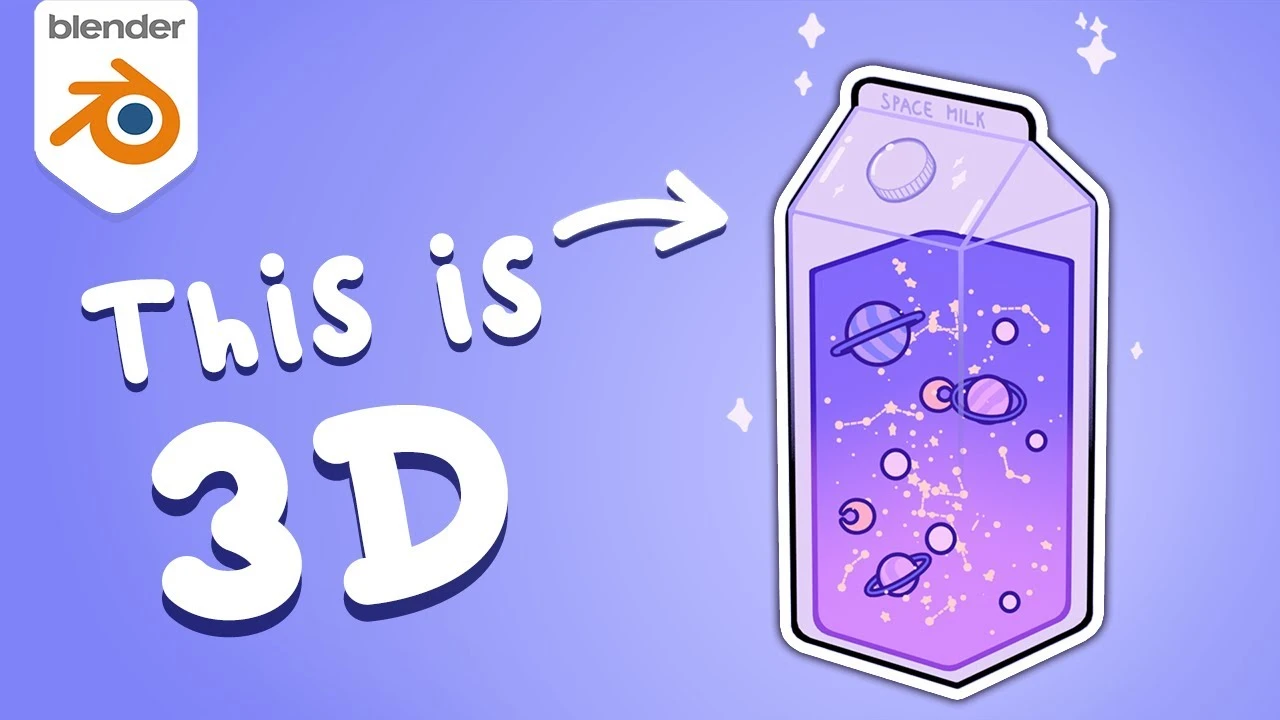
5 Toon Shading Tips You Must Know (Blender)
Beginner🍅 Pomodoro Timer
Study for 25 min, then take a break. Improves focus!
Description
Get the project file:
/ levimagony
https://levimagony.gumroad.com
Space Milk credit to fresh_bobatae:
/ b6n1jnllnsy
✨ Subscribe to my newsletter for FREE to get 3D news, exclusive tutorials, freebies and inspiration: https://levimagony.myflodesk.com/news...
💜PAINT FILTER💜
Make your render look like a painting using these addons:
https://blendermarket.com/creators/al...
💜 FREE ASSETS 💜
Drag and drop more than 10K 3D assets from BlenderKit into your scene: https://www.blenderkit.com/r/levi/
💜 MAKE ADDONS WITHOUT CODING 💜
Use Serpens for visual scripting (try it out for FREE):
https://blendermarket.com/products/se...
In this video I'm showing you 5 cool cartoon tips in Blender. One of my favourite is the magic transparency, you can easily achieve this effect with the backfacing socket from the geometry node in the shader editor. This is the perfect way to make your transparent object look flat shaded.
If you like that outlined look and don't know how to make it then stick around because i show you that as well.
Secondary outline, no problem the wireframe modifier helps you in that.
I'm also showing how you can create hand painted stars but if you prefer proceduralism (is this a word?) you can find the node setup in the video as well.
The last two tips is about cartoon glass shader with cartoon reflections, it's tricky but once you have it, you can create a whole range of cartoon glass styles, flat or even semi-realistic ones.
Happy Blending!
Timestamps:
0:00 Magic Transparency
0:36 Outline
1:07 Secondary Outline
1:23 Stars and Highlights
1:49 Glass
2:16 Reflections
2:55 Patreon
Follow me:
Twitch: / lewiww
Instagram: / levimagony
TikTok: / levimagony
Twitter: / levimagony
ArtStation: https://www.artstation.com/lewiw
Business inquiries: levimagony@gmail.com
If something doesn't work, recalculate normals and apply scale. These two bad boys mess up everything if they aren't right.
Glass fix: I checked my old file and the glass doesn't look as I show you here, probably bc blender has been updated since I published this video, and they've changed things.
To recreate the effect, follow everything what I'm showing in the video but instead of setting the Transmission Roughness to 0.69 change the Roughness to 0.69 and it'll look just like mine. Change the blending from opaque to alpha blend.
*The links above include affiliate commission or referrals. I'm part of an affiliate network and I receive compensation from partner websites. Basically you pay the same amount as you would but I get a small percentage for advertising the product, you'll get an awesome product while supporting me.
/ levimagony
https://levimagony.gumroad.com
Space Milk credit to fresh_bobatae:
/ b6n1jnllnsy
✨ Subscribe to my newsletter for FREE to get 3D news, exclusive tutorials, freebies and inspiration: https://levimagony.myflodesk.com/news...
💜PAINT FILTER💜
Make your render look like a painting using these addons:
https://blendermarket.com/creators/al...
💜 FREE ASSETS 💜
Drag and drop more than 10K 3D assets from BlenderKit into your scene: https://www.blenderkit.com/r/levi/
💜 MAKE ADDONS WITHOUT CODING 💜
Use Serpens for visual scripting (try it out for FREE):
https://blendermarket.com/products/se...
In this video I'm showing you 5 cool cartoon tips in Blender. One of my favourite is the magic transparency, you can easily achieve this effect with the backfacing socket from the geometry node in the shader editor. This is the perfect way to make your transparent object look flat shaded.
If you like that outlined look and don't know how to make it then stick around because i show you that as well.
Secondary outline, no problem the wireframe modifier helps you in that.
I'm also showing how you can create hand painted stars but if you prefer proceduralism (is this a word?) you can find the node setup in the video as well.
The last two tips is about cartoon glass shader with cartoon reflections, it's tricky but once you have it, you can create a whole range of cartoon glass styles, flat or even semi-realistic ones.
Happy Blending!
Timestamps:
0:00 Magic Transparency
0:36 Outline
1:07 Secondary Outline
1:23 Stars and Highlights
1:49 Glass
2:16 Reflections
2:55 Patreon
Follow me:
Twitch: / lewiww
Instagram: / levimagony
TikTok: / levimagony
Twitter: / levimagony
ArtStation: https://www.artstation.com/lewiw
Business inquiries: levimagony@gmail.com
If something doesn't work, recalculate normals and apply scale. These two bad boys mess up everything if they aren't right.
Glass fix: I checked my old file and the glass doesn't look as I show you here, probably bc blender has been updated since I published this video, and they've changed things.
To recreate the effect, follow everything what I'm showing in the video but instead of setting the Transmission Roughness to 0.69 change the Roughness to 0.69 and it'll look just like mine. Change the blending from opaque to alpha blend.
*The links above include affiliate commission or referrals. I'm part of an affiliate network and I receive compensation from partner websites. Basically you pay the same amount as you would but I get a small percentage for advertising the product, you'll get an awesome product while supporting me.
Up Next




La IA acaba de llegar a Blender… pero no como imaginaba
Aura Prods
Hyper Realistic Water is this EASY in 3D Graphics
CG Geek
1 Easy Way to Make Better Environments in Blender
ManjuRam
Mastering Sub-D and Low Poly 3D Modeling
On Mars 3D
Sculpting a cliff in Blender (timelapse)
Blender Guru
How to make a short film in Blender
Pierrick Picaut
Easy Fog in Blender
Blender Guru
Everyhing you need to know about linking and library overrides in Blender
Pierrick Picaut
How to Create Professional Materials
Kaizen
Photorealistic Water In Blender
Extra 3d