¡Tiempo de descanso!
Tu sesión Pomodoro ha terminado
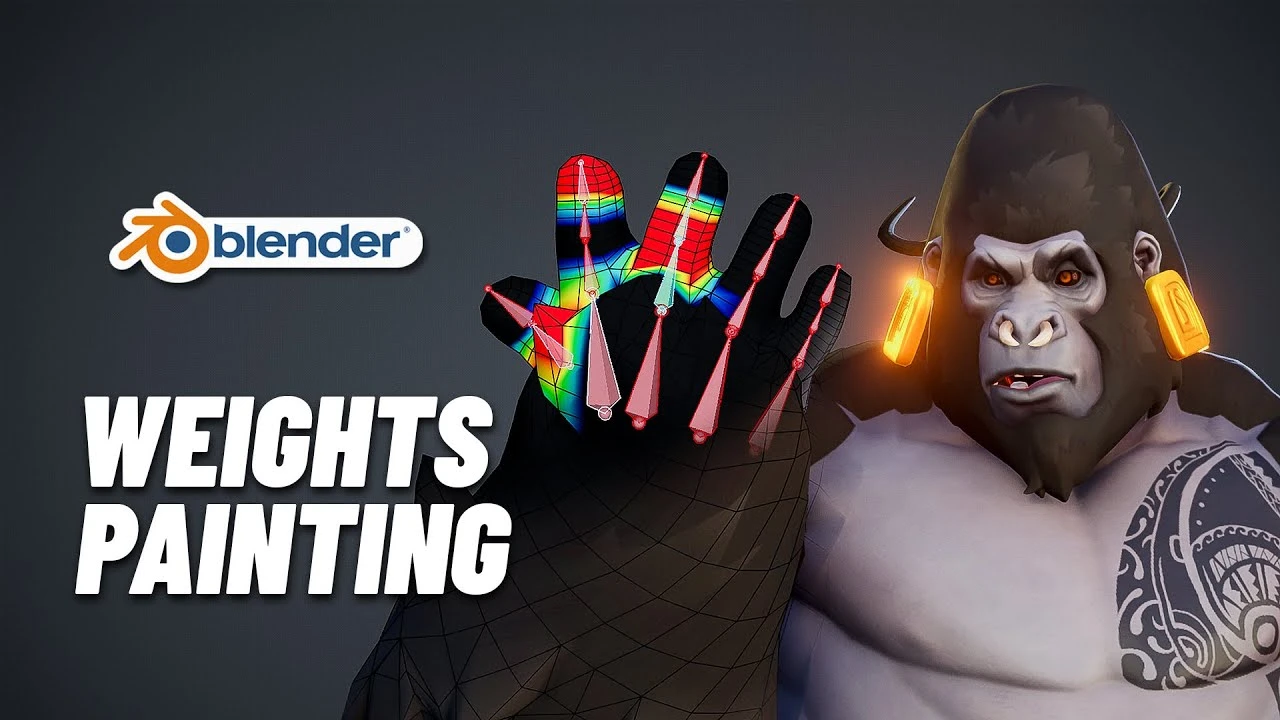
My secret Blender weights painting & skinning trick you will love!
Principiante🍅 Timer Pomodoro
Estudia 25 min, luego toma un descanso. ¡Mejora la concentración!
Descripción
Discover how to weight paint non symmetrical characters in Blender. How to fix non symmetrical meshes and how to take advantage of the Data transfer modifiers to skin complex characters and cloth.
🔥 Discover all my courses and free assets on P2design Academy🔥
👉 https://www.p2design-academy.com/
-------------------------------------------------------------------------------------------------------------------------------
🤸♂️ Blender animation course 👉 https://www.p2design-academy.com/p/al...
🦴 rigging course 👉www.p2design-academy.com/p/the-art-of-effective-rigging-2
⚡VFX in Unreal engine 5 course 👉 https://www.p2design-academy.com/p/ab...
-------------------------------------------------------------------------------------------------------------------------------
❤Content I love from CGBoost ❤
👀New course! Master Urban Environments Course 👉https://academy.cgboost.com/p/master-...
👶Start learning blender today 👉 https://academy.cgboost.com/courses/b...
🤖Create funny robots and animate them👉
https://academy.cgboost.com/p/robotic...
-------------------------------------------------------------------------------------------------------------------------------
🔔Follow me on🔔
twitter : / pierrick_picaut
Instagram : / pierrickpicaut
artstation : https://www.artstation.com/pieriko
http://www.p2design.eu/
-------------------------------------------------------------------------------------------------------------------------------
#blender #tutorial #3D #animation #art #rigging
00:00 intro
01:09 Identify non symmetrical meshes
02:07 Why is my character non symmetrical
02:30 First solution
03:35 Data transfer trick
05:36 Non symmetrical character
07:30 More about the Data transfer modifier
10:27 Skinning cloth
-------------------------------------------------------------------------------------------------------------------------------
Disclosure: Some of the links above are affiliate links, which means that if you choose to make a purchase, we will earn a commission. This commission comes at no additional cost to you. We only recommend products that are helpful and useful, not because of the small commissions we make. Please do not spend any money on these products unless you feel you need them or that they will help you achieve your goals.
Copyright Disclaimer Under Section 107 of the Copyright Act 1976, allowance is made for "fair use" for purposes such as criticism, comment, news reporting, teaching, scholarship, and research. Fair use is a use permitted by copyright statute that might otherwise be infringing. Non-profit, educational or personal use tips the balance in favor of fair use. No copyright infringement intended. ALL RIGHTS BELONG TO THEIR RESPECTIVE OWNERS
🔥 Discover all my courses and free assets on P2design Academy🔥
👉 https://www.p2design-academy.com/
-------------------------------------------------------------------------------------------------------------------------------
🤸♂️ Blender animation course 👉 https://www.p2design-academy.com/p/al...
🦴 rigging course 👉www.p2design-academy.com/p/the-art-of-effective-rigging-2
⚡VFX in Unreal engine 5 course 👉 https://www.p2design-academy.com/p/ab...
-------------------------------------------------------------------------------------------------------------------------------
❤Content I love from CGBoost ❤
👀New course! Master Urban Environments Course 👉https://academy.cgboost.com/p/master-...
👶Start learning blender today 👉 https://academy.cgboost.com/courses/b...
🤖Create funny robots and animate them👉
https://academy.cgboost.com/p/robotic...
-------------------------------------------------------------------------------------------------------------------------------
🔔Follow me on🔔
twitter : / pierrick_picaut
Instagram : / pierrickpicaut
artstation : https://www.artstation.com/pieriko
http://www.p2design.eu/
-------------------------------------------------------------------------------------------------------------------------------
#blender #tutorial #3D #animation #art #rigging
00:00 intro
01:09 Identify non symmetrical meshes
02:07 Why is my character non symmetrical
02:30 First solution
03:35 Data transfer trick
05:36 Non symmetrical character
07:30 More about the Data transfer modifier
10:27 Skinning cloth
-------------------------------------------------------------------------------------------------------------------------------
Disclosure: Some of the links above are affiliate links, which means that if you choose to make a purchase, we will earn a commission. This commission comes at no additional cost to you. We only recommend products that are helpful and useful, not because of the small commissions we make. Please do not spend any money on these products unless you feel you need them or that they will help you achieve your goals.
Copyright Disclaimer Under Section 107 of the Copyright Act 1976, allowance is made for "fair use" for purposes such as criticism, comment, news reporting, teaching, scholarship, and research. Fair use is a use permitted by copyright statute that might otherwise be infringing. Non-profit, educational or personal use tips the balance in favor of fair use. No copyright infringement intended. ALL RIGHTS BELONG TO THEIR RESPECTIVE OWNERS
A continuación






La IA acaba de llegar a Blender… pero no como imaginaba
Aura Prods
1 Easy Way to Make Better Environments in Blender
ManjuRam
The ULTIMATE guide to denoising in Blender | Blender Tutorial
Ethan Davis
Sculpting a cliff in Blender (timelapse)
Blender Guru
Procedural Dark Leather Material (Blender Tutorial)
Ryan King Art
How To Rig And Animate A Gun In Blender
Tvtig
Easy Fog in Blender
Blender Guru
Making Realistic interior in Blender
P-Designz
Realistic Outdoor Lighting In Blender
Extra 3d
Easy Vintage Style Christmas Lights💡Geometry Nodes (Blender Tutorial)
Ryan King Art