¡Tiempo de descanso!
Tu sesión Pomodoro ha terminado
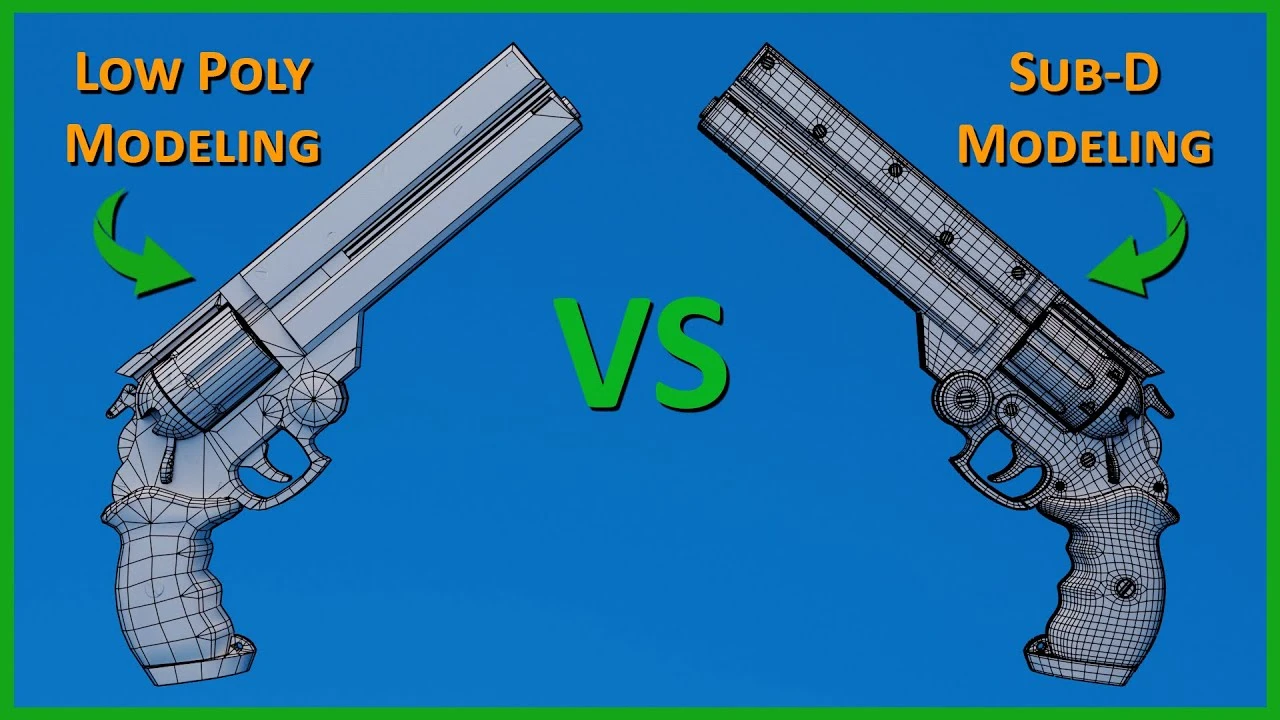
Mastering Sub-D and Low Poly 3D Modeling
Principiante🍅 Timer Pomodoro
Estudia 25 min, luego toma un descanso. ¡Mejora la concentración!
Descripción
Master 3D Modeling and Topology Today: https://www.onmars3d.com/
Ever found yourself puzzled over which 3D modeling technique to use for a project? Today, we're diving into the world of 3D modeling, comparing low poly and Sub-D modeling techniques. Whether you're a beginner or looking to refine your skills, this video will shed light on these essential tools in a 3D artist's arsenal.
Join my Discord: / discord
Patreon: / onmars3d
Artstation: https://www.artstation.com/onmars3d
Instagram: / onmars3d
Twitter: / onmars3d
Software used in Tutorial:
Blender 4.1
Unreal Engine 5.4
Substance Painter 9.1.2
#blender #3dmodeling #3dart
-----------------------------------------------------------------------------------------------------------------------------------------------------
Video Editor: AB - 1999baber.s@gmail.com
-----------------------------------------------------------------------------------------------------------------------------------------------------
Table of Contents
0:00 Introduction
0:26 What is Sub-D Modeling
0:51 Sub-D Topology Tips
1:07 Sub-D Tip 1: Quads, Tris, nGons
2:08 Sub-D Tip 2: Edge Distribution
2:56 Sub-D Tip 3: Holding Lines
3:18 When to use Sub-D Modeling
4:03 Topology Master Class
4:45 What is Low Poly Modeling
5:20 Low Poly Tri Count: Context Matters
6:12 How to Achieve High Details on Low Poly Models
6:58 Low Poly Tip 1: Silhouette
7:28 Low Poly Tip 2: Distance from Camera
7:46 Low Poly Tip 3: Tris for Optimization
8:35 When to use Sub-D vs Low Poly Modeling
9:10 Wrap Up
9:20 Patreon Support
-----------------------------------------------------------------------------------------------------------------------------------------------------
Ever found yourself puzzled over which 3D modeling technique to use for a project? Today, we're diving into the world of 3D modeling, comparing low poly and Sub-D modeling techniques. Whether you're a beginner or looking to refine your skills, this video will shed light on these essential tools in a 3D artist's arsenal.
Join my Discord: / discord
Patreon: / onmars3d
Artstation: https://www.artstation.com/onmars3d
Instagram: / onmars3d
Twitter: / onmars3d
Software used in Tutorial:
Blender 4.1
Unreal Engine 5.4
Substance Painter 9.1.2
#blender #3dmodeling #3dart
-----------------------------------------------------------------------------------------------------------------------------------------------------
Video Editor: AB - 1999baber.s@gmail.com
-----------------------------------------------------------------------------------------------------------------------------------------------------
Table of Contents
0:00 Introduction
0:26 What is Sub-D Modeling
0:51 Sub-D Topology Tips
1:07 Sub-D Tip 1: Quads, Tris, nGons
2:08 Sub-D Tip 2: Edge Distribution
2:56 Sub-D Tip 3: Holding Lines
3:18 When to use Sub-D Modeling
4:03 Topology Master Class
4:45 What is Low Poly Modeling
5:20 Low Poly Tri Count: Context Matters
6:12 How to Achieve High Details on Low Poly Models
6:58 Low Poly Tip 1: Silhouette
7:28 Low Poly Tip 2: Distance from Camera
7:46 Low Poly Tip 3: Tris for Optimization
8:35 When to use Sub-D vs Low Poly Modeling
9:10 Wrap Up
9:20 Patreon Support
-----------------------------------------------------------------------------------------------------------------------------------------------------
A continuación






La IA acaba de llegar a Blender… pero no como imaginaba
Aura Prods
1 Easy Way to Make Better Environments in Blender
ManjuRam
The ULTIMATE guide to denoising in Blender | Blender Tutorial
Ethan Davis
Sculpting a cliff in Blender (timelapse)
Blender Guru
Procedural Dark Leather Material (Blender Tutorial)
Ryan King Art
How To Rig And Animate A Gun In Blender
Tvtig
Easy Fog in Blender
Blender Guru
Making Realistic interior in Blender
P-Designz
Realistic Outdoor Lighting In Blender
Extra 3d
Easy Vintage Style Christmas Lights💡Geometry Nodes (Blender Tutorial)
Ryan King Art