Break time!
Your Pomodoro session has ended
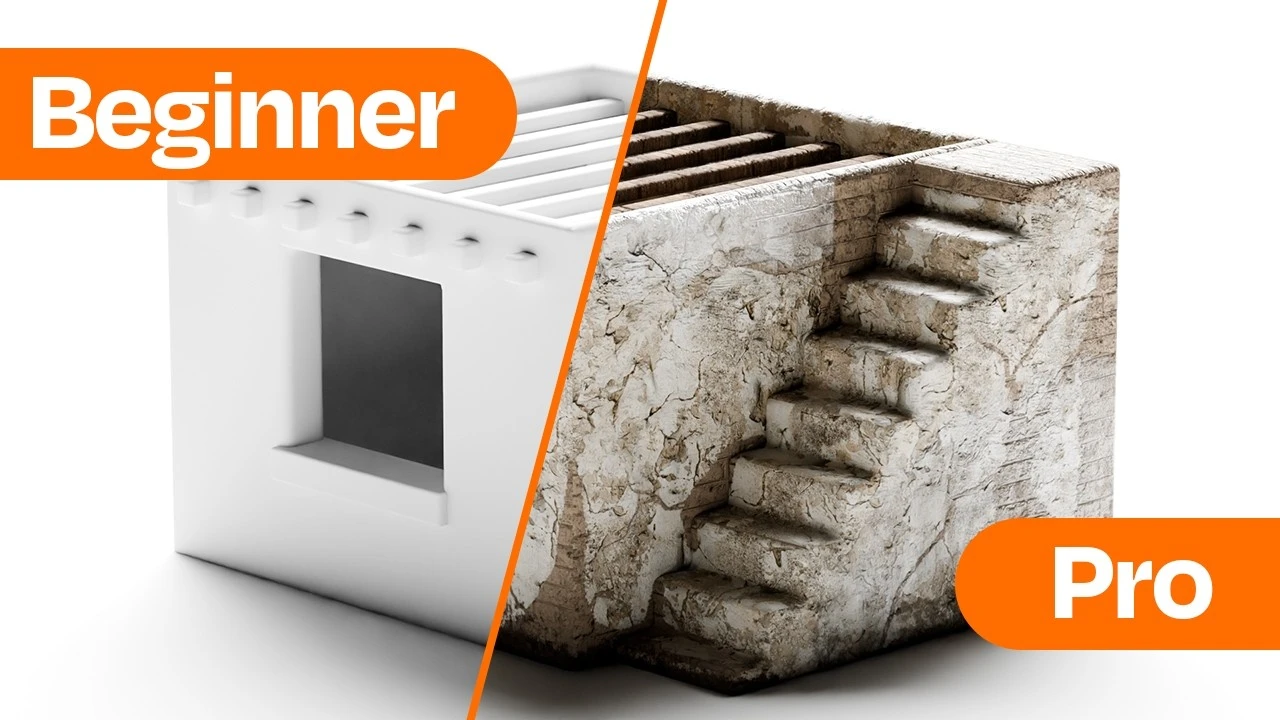
Master Texture Painting in Blender – No Experience Needed!
Beginner🍅 Pomodoro Timer
Study for 25 min, then take a break. Improves focus!
Description
NEW: Our new website is live on beta launch! https://PolySuite.app
All in one hub for better workflow
🔗 Check Out Our Add-Ons:
Water Droplet Addon: https://blendermarket.com/products/po...
Render Pro Addon: https://playgroundhub.gumroad.com/l/r...
Learn How to Texture Paint Like a Pro in Blender!
Want to take your models from flat and boring to realistic and detailed? In this tutorial, I’ll show you the easiest way to texture paint in Blender using simple brushes, stencils, and material swaps. Whether you’re a beginner or an advanced artist, this method will help you add wear, cracks, scratches, and depth to your models—fast!
📌 What You’ll Learn:
✅ How to set up materials for texture painting
✅ The best way to setup custom brushes for detail
✅ How to paint realistic cracks, dirt, and wear
✅ How to use stencils for rust, damage, and extra details
✅ How to swap materials instantly for a completely new look
By the end of this video, you’ll have a fully textured model that looks realistic and unique!
🔥 Resources Mentioned in the Video:
🔹 PolyHaven - Free Textures
🔹 BlenderKit - Free & Paid Materials
🔹 Node Wrangler Addon (Blender)
🔗 Affiliate Links:
• Divine Cut Addon: https://blendermarket.com/products/di...
• Procedural Crowds: https://blendermarket.com/products/pr...
• Clay-doh: https://blendermarket.com/products/cl...
• Gobo Textures: https://blendermarket.com/products/go...
💬 Follow Us:
Instagram: / polyplaygroundhub
All in one hub for better workflow
🔗 Check Out Our Add-Ons:
Water Droplet Addon: https://blendermarket.com/products/po...
Render Pro Addon: https://playgroundhub.gumroad.com/l/r...
Learn How to Texture Paint Like a Pro in Blender!
Want to take your models from flat and boring to realistic and detailed? In this tutorial, I’ll show you the easiest way to texture paint in Blender using simple brushes, stencils, and material swaps. Whether you’re a beginner or an advanced artist, this method will help you add wear, cracks, scratches, and depth to your models—fast!
📌 What You’ll Learn:
✅ How to set up materials for texture painting
✅ The best way to setup custom brushes for detail
✅ How to paint realistic cracks, dirt, and wear
✅ How to use stencils for rust, damage, and extra details
✅ How to swap materials instantly for a completely new look
By the end of this video, you’ll have a fully textured model that looks realistic and unique!
🔥 Resources Mentioned in the Video:
🔹 PolyHaven - Free Textures
🔹 BlenderKit - Free & Paid Materials
🔹 Node Wrangler Addon (Blender)
🔗 Affiliate Links:
• Divine Cut Addon: https://blendermarket.com/products/di...
• Procedural Crowds: https://blendermarket.com/products/pr...
• Clay-doh: https://blendermarket.com/products/cl...
• Gobo Textures: https://blendermarket.com/products/go...
💬 Follow Us:
Instagram: / polyplaygroundhub
Up Next






La IA acaba de llegar a Blender… pero no como imaginaba
Aura Prods
1 Easy Way to Make Better Environments in Blender
ManjuRam
Procedural Dark Leather Material (Blender Tutorial)
Ryan King Art
Easy Realistic Architecture And Environments In Blender - Beginner tutorial
AlternaVision Studio
Sculpting a cliff in Blender (timelapse)
Blender Guru
Easy Fog in Blender
Blender Guru
Mastering Sub-D and Low Poly 3D Modeling
On Mars 3D
How to make an abandoned house in Blender - Tutorial
Blender Guru
Create Realistic Mountains with Blender 5.0 and Gaea 2
Maarten Nauta
Blender 3.0 Beginner Tutorial Part 12: Floating Particles
Blender Guru