Break time!
Your Pomodoro session has ended
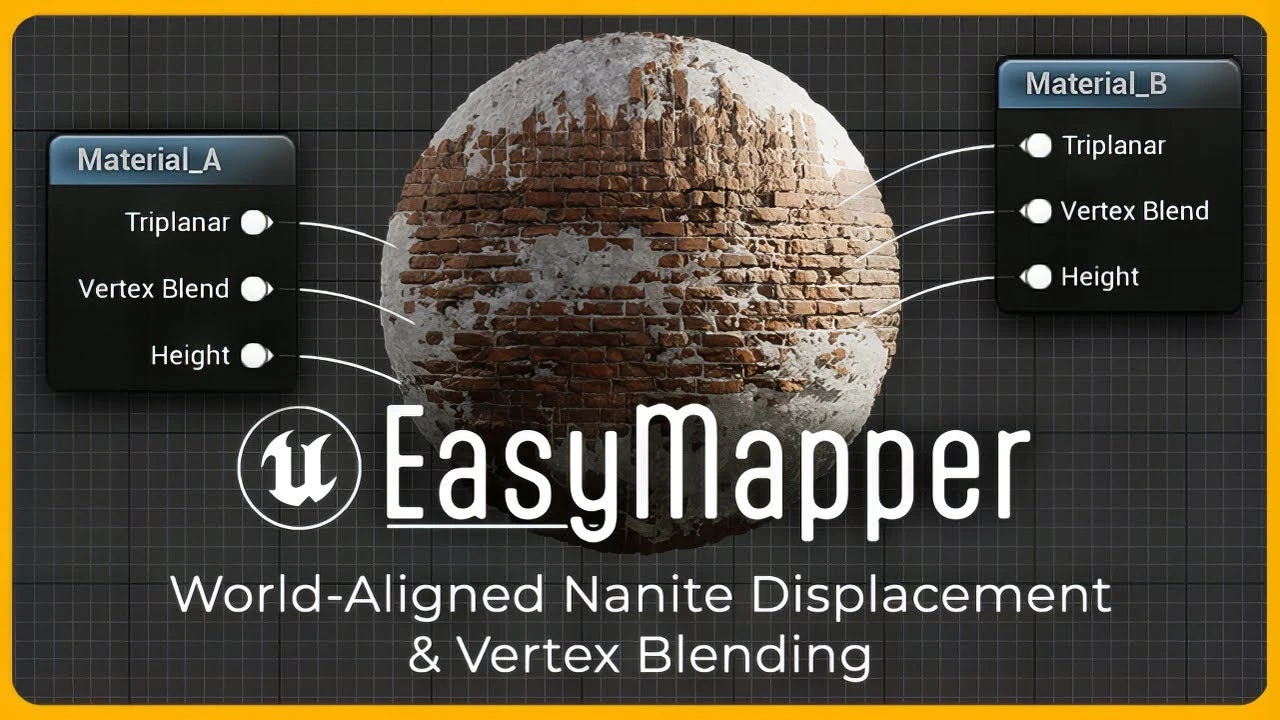
Introducing EasyMapper for Unreal Engine 5
Beginner🍅 Pomodoro Timer
Study for 25 min, then take a break. Improves focus!
Description
EasyMapper is a Master Material setup that supports World-Aligned (Triplanar) texture projection, combined with Nanite tessellation/displacement, and Advanced Vertex Blending, allowing you to blend up to 3 materials in one simple, elegant package, for easy texture blending across assets.
Purchase EasyMapper HERE: https://www.unrealengine.com/marketpl...
Console Variables to Copy to your DefaultEngine.ini file:
r.Nanite.AllowTessellation=1
r.Nanite.Tessellation=1
#epicambassador
To download RealityCapture, visit: www.capturingreality.com
Photogrammetry / 3D Scanning Tutorials:
RealityCapture to Unreal Engine 5: • RealityCapture to UE5 - Workflow Tutorial
Texture Reprojection: • Texture Reprojection in RealityCapture! [R...
Capturing Lofoten in UE5: • Capturing Lofoten in Unreal Engine 5
Cross-Polarization Tutorial: • The Key to Cleaner 3D Scans: Cross-Polariz...
Scanning Glass Objects: • Creating an Arctic Environment in Unreal E...
Axe Diorama Workflow: • How I Made This Shot in Unreal Engine 5
Lighting Tutorial For Beginners: • Lighting in Unreal Engine 5 for Beginners
Color Grading in Davinci Resolve: • Unreal to Davinci Resolve Workflow - ACES ...
Purchase EasyFog for Unreal Engine 5: https://www.unrealengine.com/marketpl...
William's Render Settings Guide: https://williamfaucher.gumroad.com/l/...
Join my Patreon to get free content and video credits!
/ williamfaucher
---------------
Timestamps:
00:00 - Intro
01:49 - DefaultEngine.ini Settings (IMPORTANT)
03:24 - EasyMapper BASICS
05:36 - Using Custom Textures
10:50 - Vertex Painting
15:36 - Advanced Vertex Blending
20:52 - Custom Meshes without World-Aligned Mapping
21:46 - Tileable Texture Creation Workflow
23:49 - Troubleshooting: Crack-Free Displacement
24:58 - Troubleshooting: Inconsistent Displacement
26:01 - Troubleshooting: Vertex Painting Issues
27:03 - Troubleshooting: Shadow Issues
28:00 - MIGRATE EasyMapper to your own project
--------Cameras and Gear Used To Film This Video ------
DISCLAIMER: This video/description contains affiliate links, which means that if you click on one of the product links, I’ll receive a small commission. As an Amazon Associate, I earn from qualifying purchases. This helps support the channel and allows us to continue to make videos like this.
Thank you for the support!
My Streaming / Recording Setup (How this Video was Recorded)
Nikon Z6II : https://geni.us/OPxBG
Nikon 28-75mm f/2.8 : https://geni.us/d47dj
RØDE NTG-3B Shotgun Microphone: https://geni.us/JKnnPpS
Aputure MC Pocket LED: https://geni.us/uVZNl
Godox LEDP 260c LED Panel: https://geni.us/OgidwX
Godox Parabolic Softbox : https://geni.us/oHZ2b9
Godox SL-60W Studio Light: https://geni.us/68wx
Purchase EasyMapper HERE: https://www.unrealengine.com/marketpl...
Console Variables to Copy to your DefaultEngine.ini file:
r.Nanite.AllowTessellation=1
r.Nanite.Tessellation=1
#epicambassador
To download RealityCapture, visit: www.capturingreality.com
Photogrammetry / 3D Scanning Tutorials:
RealityCapture to Unreal Engine 5: • RealityCapture to UE5 - Workflow Tutorial
Texture Reprojection: • Texture Reprojection in RealityCapture! [R...
Capturing Lofoten in UE5: • Capturing Lofoten in Unreal Engine 5
Cross-Polarization Tutorial: • The Key to Cleaner 3D Scans: Cross-Polariz...
Scanning Glass Objects: • Creating an Arctic Environment in Unreal E...
Axe Diorama Workflow: • How I Made This Shot in Unreal Engine 5
Lighting Tutorial For Beginners: • Lighting in Unreal Engine 5 for Beginners
Color Grading in Davinci Resolve: • Unreal to Davinci Resolve Workflow - ACES ...
Purchase EasyFog for Unreal Engine 5: https://www.unrealengine.com/marketpl...
William's Render Settings Guide: https://williamfaucher.gumroad.com/l/...
Join my Patreon to get free content and video credits!
/ williamfaucher
---------------
Timestamps:
00:00 - Intro
01:49 - DefaultEngine.ini Settings (IMPORTANT)
03:24 - EasyMapper BASICS
05:36 - Using Custom Textures
10:50 - Vertex Painting
15:36 - Advanced Vertex Blending
20:52 - Custom Meshes without World-Aligned Mapping
21:46 - Tileable Texture Creation Workflow
23:49 - Troubleshooting: Crack-Free Displacement
24:58 - Troubleshooting: Inconsistent Displacement
26:01 - Troubleshooting: Vertex Painting Issues
27:03 - Troubleshooting: Shadow Issues
28:00 - MIGRATE EasyMapper to your own project
--------Cameras and Gear Used To Film This Video ------
DISCLAIMER: This video/description contains affiliate links, which means that if you click on one of the product links, I’ll receive a small commission. As an Amazon Associate, I earn from qualifying purchases. This helps support the channel and allows us to continue to make videos like this.
Thank you for the support!
My Streaming / Recording Setup (How this Video was Recorded)
Nikon Z6II : https://geni.us/OPxBG
Nikon 28-75mm f/2.8 : https://geni.us/d47dj
RØDE NTG-3B Shotgun Microphone: https://geni.us/JKnnPpS
Aputure MC Pocket LED: https://geni.us/uVZNl
Godox LEDP 260c LED Panel: https://geni.us/OgidwX
Godox Parabolic Softbox : https://geni.us/oHZ2b9
Godox SL-60W Studio Light: https://geni.us/68wx
Up Next




Movie Render Graph Intro | Unreal Engine Animation Hub
Unreal Engine
Unreal Engine 5 Tutorial: Lidar Pulse & Echolocation Effect
UnrealVolunteer
Download UE and Get Started
Unreal Engine
Chateau Project Overview | Unreal Engine 5.4
Megatecture
Unreal Engine 5 Beginner Tutorial Part 16 : Cameras, Rig Rail, and Crane
Bad Decisions Studio
Unreal Engine 5 Beginner Tutorial Part 7: Materials & Textures Basics
Bad Decisions Studio
Profiling with Purpose: Performance Lessons from a Real Unreal Project | Unreal Fest Stockholm 2025
Unreal Engine
Modelling a Sci-Fi Apartment in Blender Substance and Unreal Engine
Nico Linde
Create a Resident Evil Style Horror Environment in Unreal Engine 5 | Small Hallway Scene Tutorial
HALbot Studios
Create the Game Over Visuals in UMG
Unreal Engine