Break time!
Your Pomodoro session has ended
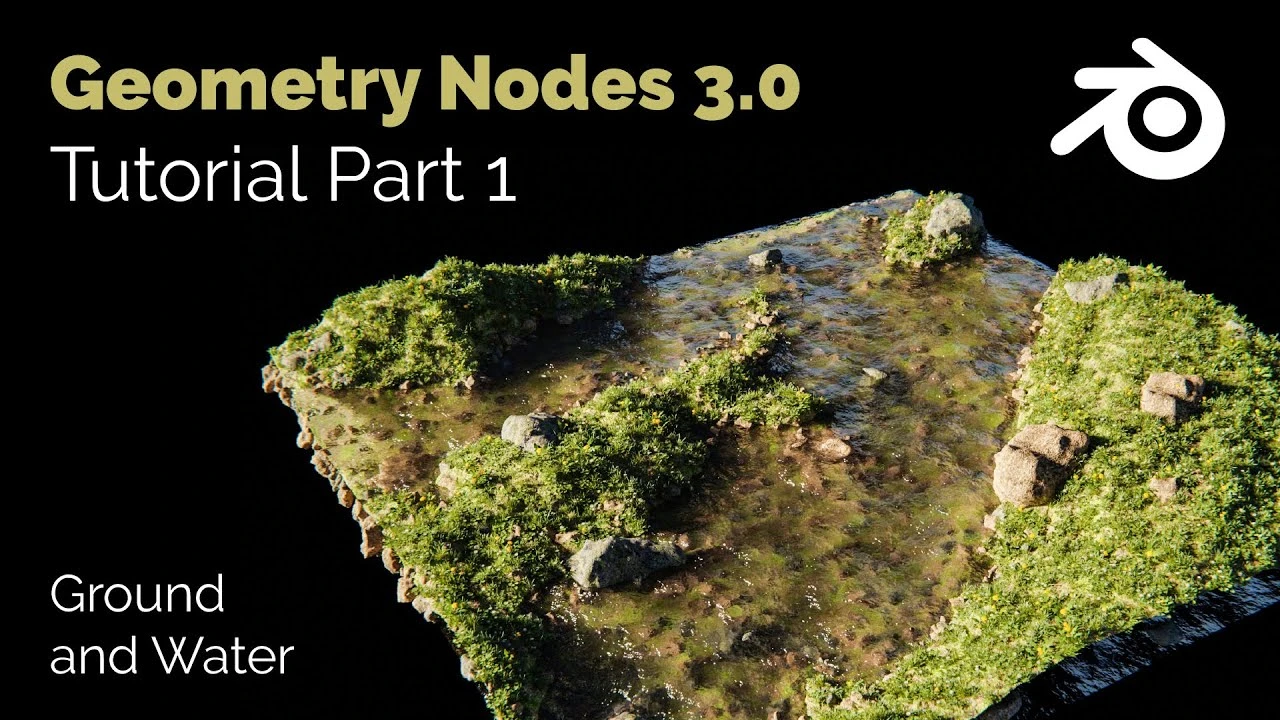
Blender Geometry Nodes 3.0 - Procedural Landscape Tutorial - Part 01
🍅 Pomodoro Timer
Study for 25 min, then take a break. Improves focus!
Description
You can download the complete model here:
https://blendersteve.gumroad.com/l/pmnky
In this tutorial I will show you how I created the modular procedural landscape with variable water level and adaptive vegetation in Blender Geometry Nodes 3.0. In this first part of the tutorial I show you the node settings for the ground control and the water. The vegetation of this Blender Geometry Nodes Model automatically adjusts to the height of the water level. Stones are positioned below the water level, which in turn are not placed above the water line. The whole thing is controlled with a Map Range Node. Both the X and Y size of the procedural landscape can theoretically be controlled arbitrarily, as well as the height and the degree of distortion.
00:00 Geometry Nodes procedural Landscape Intro
00:50 Generate Grid for procedural Landscape
01:50 Noise Texture to Landscape Grid
07:40 Geometry Nodes Water Grid
09:30 Material Node and Switch Node to procedural Landscape Grid
Similar Geometry Node Tutorials:
Geometry Nodes Tiny Planet: https://youtu.be/7PegGKxy3b4
Geometry Nodes Lonely Island: https://youtu.be/YFsmIzQfQRA
Geometry Nodes Modular Furniture: https://youtu.be/aE66DP5BlTc
https://blendersteve.gumroad.com/l/pmnky
In this tutorial I will show you how I created the modular procedural landscape with variable water level and adaptive vegetation in Blender Geometry Nodes 3.0. In this first part of the tutorial I show you the node settings for the ground control and the water. The vegetation of this Blender Geometry Nodes Model automatically adjusts to the height of the water level. Stones are positioned below the water level, which in turn are not placed above the water line. The whole thing is controlled with a Map Range Node. Both the X and Y size of the procedural landscape can theoretically be controlled arbitrarily, as well as the height and the degree of distortion.
00:00 Geometry Nodes procedural Landscape Intro
00:50 Generate Grid for procedural Landscape
01:50 Noise Texture to Landscape Grid
07:40 Geometry Nodes Water Grid
09:30 Material Node and Switch Node to procedural Landscape Grid
Similar Geometry Node Tutorials:
Geometry Nodes Tiny Planet: https://youtu.be/7PegGKxy3b4
Geometry Nodes Lonely Island: https://youtu.be/YFsmIzQfQRA
Geometry Nodes Modular Furniture: https://youtu.be/aE66DP5BlTc
Up Next







La IA acaba de llegar a Blender… pero no como imaginaba
Aura Prods
1 Easy Way to Make Better Environments in Blender
ManjuRam
How I Made The Medieval Houses Modular Kit in Blender
Vertex Horizons
Creating a Buddhist Monastery Environment in Blender
That3dGuy
Simulación de Destrucción en Blender Rigid Bodies Cell Fracture ⭐ ⭐ ⭐ ⭐ ⭐
Blender Deluxe Tutoriales
Stylized Trees with Snow 🌲 Geometry Nodes (Blender Tutorial)
Ryan King Art
Sculpting a cliff in Blender (timelapse)
Blender Guru
Blender Beginner Chair Modelling Tutorial - Part 3
Blender Guru
Easy Fog in Blender
Blender Guru
Blender Tutorial - Creating a Stormy Ocean
Blender Made Easy