¡Tiempo de descanso!
Tu sesión Pomodoro ha terminado
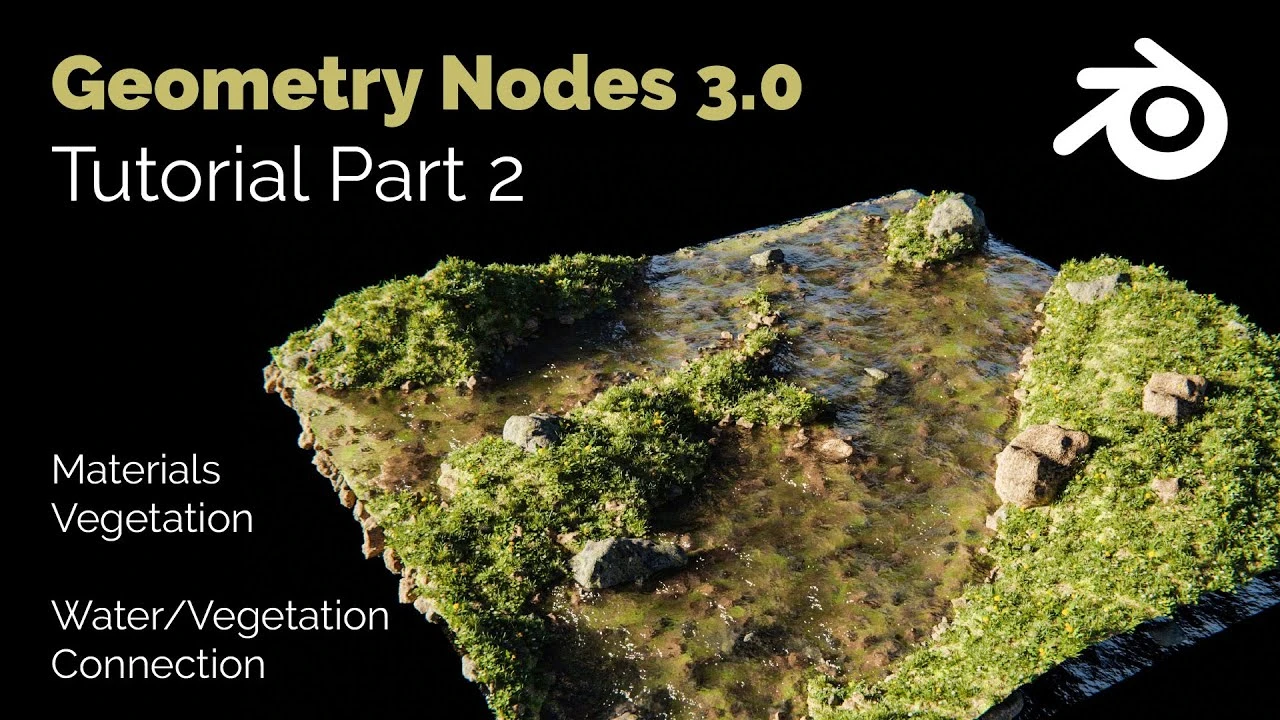
Blender Geometry Nodes 3.0 - Modular Landscape Tutorial - Part 02
🍅 Timer Pomodoro
Estudia 25 min, luego toma un descanso. ¡Mejora la concentración!
Descripción
You can download the complete model here:
https://blendersteve.gumroad.com/l/pmnky
In this part of the Blender Geometry Nodes 3.0 tutorial we will add the vegetation models, set textures and make the connection between the vegetation and the water level. The vegetation of this Blender Geometry Nodes Model automatically adjusts to the height of the water level. Stones are positioned below the water level, which in turn are not placed above the water line. The whole thing is controlled with a Map Range Node. Both the X and Y size of the landscape can theoretically be controlled arbitrarily, as well as the height and the degree of distortion.
00:00 Geometry Nodes Landscape Intro
00:45 Summary of Geometry Nodes Tutorial Part 1
02:36 Adding Grass Instances to Geometry Nodes Grid
03:35 Using Collection in Geometry Nodes
05:40 Geometry Nodes Random Grass Distribution and Scale
08:25 Map Range Node to control vegetation above Water level
15:45 Map Range Node to control rocks below water level
19:45 Increase Render Speed with Acitvating Bounds
Similar Geometry Node Tutorials:
Geometry Nodes Tiny Planet: https://youtu.be/7PegGKxy3b4
Geometry Nodes Lonely Island: https://youtu.be/YFsmIzQfQRA
Geometry Nodes Modular Furniture: https://youtu.be/aE66DP5BlTc
https://blendersteve.gumroad.com/l/pmnky
In this part of the Blender Geometry Nodes 3.0 tutorial we will add the vegetation models, set textures and make the connection between the vegetation and the water level. The vegetation of this Blender Geometry Nodes Model automatically adjusts to the height of the water level. Stones are positioned below the water level, which in turn are not placed above the water line. The whole thing is controlled with a Map Range Node. Both the X and Y size of the landscape can theoretically be controlled arbitrarily, as well as the height and the degree of distortion.
00:00 Geometry Nodes Landscape Intro
00:45 Summary of Geometry Nodes Tutorial Part 1
02:36 Adding Grass Instances to Geometry Nodes Grid
03:35 Using Collection in Geometry Nodes
05:40 Geometry Nodes Random Grass Distribution and Scale
08:25 Map Range Node to control vegetation above Water level
15:45 Map Range Node to control rocks below water level
19:45 Increase Render Speed with Acitvating Bounds
Similar Geometry Node Tutorials:
Geometry Nodes Tiny Planet: https://youtu.be/7PegGKxy3b4
Geometry Nodes Lonely Island: https://youtu.be/YFsmIzQfQRA
Geometry Nodes Modular Furniture: https://youtu.be/aE66DP5BlTc
A continuación




La IA acaba de llegar a Blender… pero no como imaginaba
Aura Prods
Make Perfect Root Motion in Blender Without Any Add-ons!
Pierrick Picaut
1 Easy Way to Make Better Environments in Blender
ManjuRam
Quick & Easy Megastructures in Blender
Nico Linde
Sculpting a cliff in Blender (timelapse)
Blender Guru
Tutorial: How to make a volumetric projector in Blender 4.5
Polyfjord
Easy Fog in Blender
Blender Guru
PBR Materials: The Ultimate Guide (Blender Tutorial)
vfx_coder
Perfect Textures in Blender - Works Every Time
Nico Linde
Fast idle animation technique in Blender
Pierrick Picaut