Break time!
Your Pomodoro session has ended
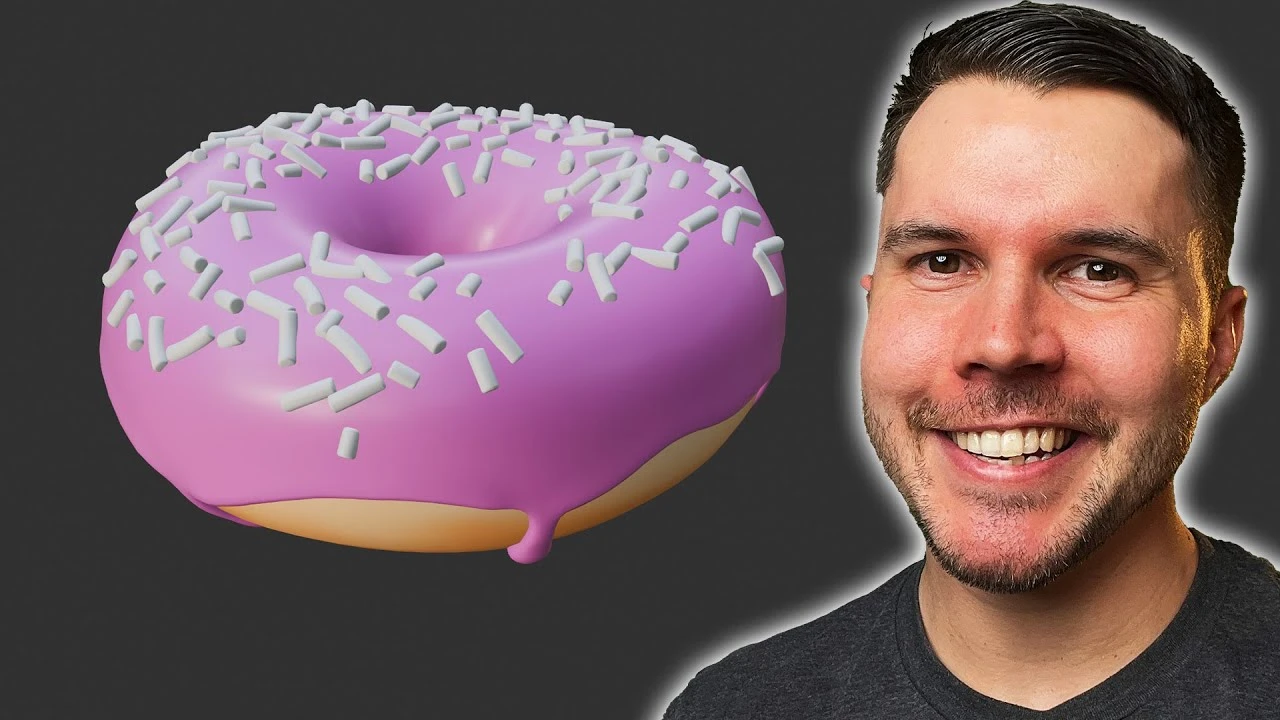
Beginner Blender 4.0 Tutorial - Part 7: Geometry Nodes (Long Sprinkles)
Beginner🍅 Pomodoro Timer
Study for 25 min, then take a break. Improves focus!
Description
This is now outdated! Watch the NEW donut tutorial, remade for Blender 5.0: https://www.youtube.com/watch?v=-tbSCMbJA6o
Let's make those long sprinkles 🍩 Part 8: https://www.youtube.com/watch?v=D2rZljDYGdM&list=PLjEaoINr3zgEPv5y--4MKpciLaoQYZB1Z&index=9
In this video you'll learn about origin points, bevels, collections and randomizing rotation.
===Links🔗===
Blender Guru Discord: https://blenderguru.com/discord
Keyboard Shortcut Cheat Sheet: https://docs.google.com/document/d/1zPBgZAdftWa6WVa7UIFUqW_7EcqOYE0X743RqFuJL3o/edit?usp=sharing
Industry Compatible Cheat Sheet (not mine, used with permission): https://drive.google.com/file/d/1drO8P6tyz9DaKNGKki2PrIBGpYwIFzU0/view?usp=drive_link
Blender Guru: http://www.blenderguru.com
Poliigon: https://www.poliigon.com/?utm_campaign=desc&utm_source=youtube&utm_medium=bg
=== Chapter Marks ✂️===
0:00 Intro
0:22 The 3D cursor
0:58 Adding the cylinder
1:34 Viewport Clipping
2:16 Modelling the sprinkle
4:38 Bevelling
5:42 Creating sprinkle variants
7:26 Creating a bent sprinkle
8:07 Reseting the origin point
9:09 Organizing with Collections
12:08 Single vs Shared Data
12:57 Unpinning Geometry nodes
13:31 Scattering an entire collection
14:52 Changing the sprinkle rotation
16:26 Changing the Rotation Euler
17:48 Randomizing rotation
21:09 Distance and sizing
===Follow me🫰===
https://twitter.com/andrewpprice
https://instagram.com/andrewpprice
https://www.linkedin.com/in/andrew-price-17678911
ArtStation: https://artstation.com/artist/andrewprice
Let's make those long sprinkles 🍩 Part 8: https://www.youtube.com/watch?v=D2rZljDYGdM&list=PLjEaoINr3zgEPv5y--4MKpciLaoQYZB1Z&index=9
In this video you'll learn about origin points, bevels, collections and randomizing rotation.
===Links🔗===
Blender Guru Discord: https://blenderguru.com/discord
Keyboard Shortcut Cheat Sheet: https://docs.google.com/document/d/1zPBgZAdftWa6WVa7UIFUqW_7EcqOYE0X743RqFuJL3o/edit?usp=sharing
Industry Compatible Cheat Sheet (not mine, used with permission): https://drive.google.com/file/d/1drO8P6tyz9DaKNGKki2PrIBGpYwIFzU0/view?usp=drive_link
Blender Guru: http://www.blenderguru.com
Poliigon: https://www.poliigon.com/?utm_campaign=desc&utm_source=youtube&utm_medium=bg
=== Chapter Marks ✂️===
0:00 Intro
0:22 The 3D cursor
0:58 Adding the cylinder
1:34 Viewport Clipping
2:16 Modelling the sprinkle
4:38 Bevelling
5:42 Creating sprinkle variants
7:26 Creating a bent sprinkle
8:07 Reseting the origin point
9:09 Organizing with Collections
12:08 Single vs Shared Data
12:57 Unpinning Geometry nodes
13:31 Scattering an entire collection
14:52 Changing the sprinkle rotation
16:26 Changing the Rotation Euler
17:48 Randomizing rotation
21:09 Distance and sizing
===Follow me🫰===
https://twitter.com/andrewpprice
https://instagram.com/andrewpprice
https://www.linkedin.com/in/andrew-price-17678911
ArtStation: https://artstation.com/artist/andrewprice
Up Next






La IA acaba de llegar a Blender… pero no como imaginaba
Aura Prods
1 Easy Way to Make Better Environments in Blender
ManjuRam
How I Made The Medieval Houses Modular Kit in Blender
Vertex Horizons
Creating a Buddhist Monastery Environment in Blender
That3dGuy
Simulación de Destrucción en Blender Rigid Bodies Cell Fracture ⭐ ⭐ ⭐ ⭐ ⭐
Blender Deluxe Tutoriales
Stylized Trees with Snow 🌲 Geometry Nodes (Blender Tutorial)
Ryan King Art
Sculpting a cliff in Blender (timelapse)
Blender Guru
Blender Beginner Chair Modelling Tutorial - Part 3
Blender Guru
Easy Fog in Blender
Blender Guru
Blender Tutorial - Creating a Stormy Ocean
Blender Made Easy