¡Tiempo de descanso!
Tu sesión Pomodoro ha terminado
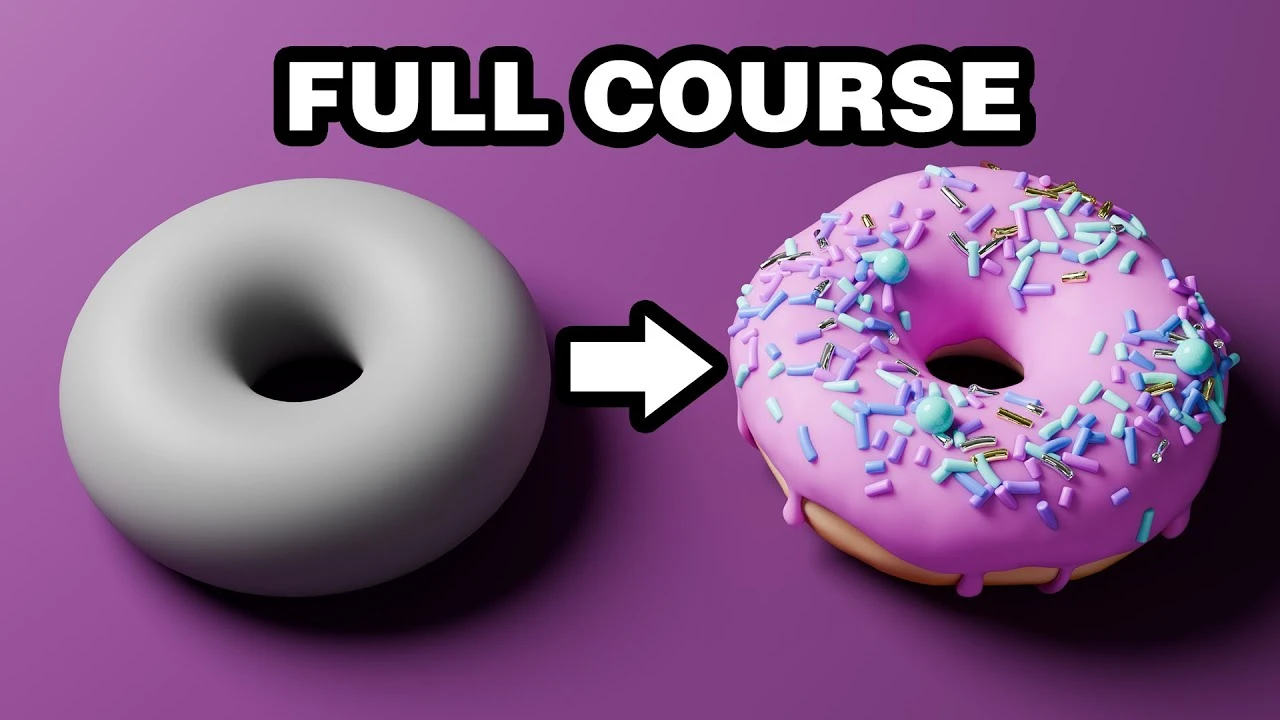
Beginner Blender 4.0 Tutorial (2023)
Principiante🍅 Timer Pomodoro
Estudia 25 min, luego toma un descanso. ¡Mejora la concentración!
Descripción
Watch the NEW donut tutorial, remade for Blender 5.0: https://www.youtube.com/watch?v=-tbSCMbJA6o
The complete beginner blender donut tutorial course in one video for those who prefer it over the multipart series.
Watch it in parts: https://www.youtube.com/playlist?list=PLjEaoINr3zgEPv5y--4MKpciLaoQYZB1Z
===Links🔗===
Blender Guru Discord: https://blenderguru.com/discord
Keyboard Shortcut Cheat Sheet: https://docs.google.com/document/d/1zPBgZAdftWa6WVa7UIFUqW_7EcqOYE0X743RqFuJL3o/edit?usp=sharing
Industry Compatible Cheat Sheet (not mine, used with permission): https://drive.google.com/file/d/1drO8P6tyz9DaKNGKki2PrIBGpYwIFzU0/view?usp=drive_link
Donate to Blender: https://fund.blender.org/
Poliigon Blender Addon: https://www.poliigon.com/blender?utm_campaign=donut4&utm_source=youtube&utm_medium=bg
Marble Texture on Poliigon: https://www.poliigon.com/texture/denali-quartzite-texture-gray/8060?utm_campaign=donut4&utm_source=youtube&utm_medium=bg
Plate model: https://www.poliigon.com/model/ceramic-plate-model-white-with-dark-specks/8110?utm_campaign=donut4&utm_source=youtube&utm_medium=bg
Utensils model: https://www.poliigon.com/model/wooden-utensils-jar-model/3441?utm_campaign=donut4&utm_source=youtube&utm_medium=bg
Upcoming Blender Course: https://blender-guru.mykajabi.com/opt-in
===Follow me🫰===
Twitter: https://twitter.com/andrewpprice
Instagram: http://instagram.com/andrewpprice
ArtStation: http://artstation.com/artist/andrewprice
LinkedIn: www.linkedin.com/in/andrew-price-17678911
=== Chapter Marks (separated by paragraph spaces for each part)✂️===
00:00 Intro
01:10 Download and Install
02:15 Interface & Navigation
05:09 Render Mode & Panning
06:33 Moving objects and camera & making a render
12:42 Change the material
15:16 Scale & Rotation
17:52 Add the Torus
22:26 Subdivision modifier
29:38 Proportional editing
31:29 Deforming the donut
32:56 Shrinking the circumference
36:30 Duplicate an object
38:25 Name objects
41:36 The solidify modifier & Snap to Face
45:16 Apply the subsurf modifier
49:35 Make the edge wavy and round
53:51 Extrusion
57:08 Technical check
58:18 Shrinkwrap modifier
1:01:14 Applying thickness
1:05:49 Inflate, Grab, & Mask brushes
1:12:46 Filter & Smooth brushes
1:18:51 Creating the countertop
1:19:24 Parenting objects
1:21:02 Countertop texture
1:24:34 Material nodes, Roughness map, & normal map
1:31:49 Texture Painting
1:37:36 Geometry Nodes
1:40:56 Scattering points
1:42:31 Make a round sprinkle & Poisson Disk
1:46:56 Weight painting
1:54:55 Accurate real-world size
1:58:10 Fix the sprinkle density
2:02:53 The cylinder
2:04:11 Model the sprinkle
2:07:37 Sprinkle variants
2:11:04 Organize with Collections
2:15:26 Scattering an entire collection & changing the sprinkle rotation
2:18:21 Rotation Euler & random rotation
2:23:04 Distance and sizing
2:26:26 Apply materials to multiple objects
2:27:38 Generate random values per materials
2:31:14 Metallic sprinkles
2:35:35 Fly navigation
2:37:36 Render engines
2:43:43 Computer too slow?
2:45:53 Reset the lamp location
2:47:12 Subsurface Scattering (SSS)
2:54:18 Image reference & modelling the plate
3:04:49 Stack the donuts
3:10:28 Assign sprinkles
3:11:22 Trackball rotation
3:12:10 Scale the countertop and making the backsplash
3:13:31 Icing colors
3:16:34 Creating a ceramic plate material
3:18:43 Sky Texture
3:21:03 Kitchen enclosure
3:23:24 Snapping feature and removing unneeded faces
3:26:39 The window
3:27:31 Shaping the light and tweaking the sun intensity
3:31:48 Import a model
3:33:45 Install an addon
3:36:05 Lighting fixes
3:39:26 Intro to compositor
3:43:11 Color management "Looks" & AgX
3:45:18 Creating glare
3:51:08 Realtime compositing
3:54:51 Lens Distortion & Chromatic Aberration
3:58:00 Keyframe basics
4:00:18 Adding a pivot object
4:01:23 Parenting to the empty
4:02:11 Create rotation keyframes
4:04:39 The Dope Sheet & The Graph Editor
4:06:35 Changing the keyframe ease
4:08:09 Keyframing the scale
4:09:47 Normalizing the Graph Editor
4:11:51 Frames per second
4:14:20 Choosing the sample count
4:17:12 Noise threshold
4:18:00 Time limit & Rendering to a still image sequence
4:21:34 Pre-Rendering Checklist Time!
4:22:00 Face orientation check
4:23:28 Unwanted object & intersection check
4:24:34 Improving the composition & lighting
4:29:06 Exposure & color check
4:31:29 Add SSS to the donut
4:34:37 Add Big Medium Small details
4:37:02 Improving the Sky lighting & Adding Depth of Field
4:39:02 Add Motion Blur
4:45:39 Editing in Premiere
4:46:17 Video Editing & Loading an image sequence
4:48:11 Holding the last frame and Fading to black
4:50:17 Export the final video
4:53:45 Donut variation challenge!
The complete beginner blender donut tutorial course in one video for those who prefer it over the multipart series.
Watch it in parts: https://www.youtube.com/playlist?list=PLjEaoINr3zgEPv5y--4MKpciLaoQYZB1Z
===Links🔗===
Blender Guru Discord: https://blenderguru.com/discord
Keyboard Shortcut Cheat Sheet: https://docs.google.com/document/d/1zPBgZAdftWa6WVa7UIFUqW_7EcqOYE0X743RqFuJL3o/edit?usp=sharing
Industry Compatible Cheat Sheet (not mine, used with permission): https://drive.google.com/file/d/1drO8P6tyz9DaKNGKki2PrIBGpYwIFzU0/view?usp=drive_link
Donate to Blender: https://fund.blender.org/
Poliigon Blender Addon: https://www.poliigon.com/blender?utm_campaign=donut4&utm_source=youtube&utm_medium=bg
Marble Texture on Poliigon: https://www.poliigon.com/texture/denali-quartzite-texture-gray/8060?utm_campaign=donut4&utm_source=youtube&utm_medium=bg
Plate model: https://www.poliigon.com/model/ceramic-plate-model-white-with-dark-specks/8110?utm_campaign=donut4&utm_source=youtube&utm_medium=bg
Utensils model: https://www.poliigon.com/model/wooden-utensils-jar-model/3441?utm_campaign=donut4&utm_source=youtube&utm_medium=bg
Upcoming Blender Course: https://blender-guru.mykajabi.com/opt-in
===Follow me🫰===
Twitter: https://twitter.com/andrewpprice
Instagram: http://instagram.com/andrewpprice
ArtStation: http://artstation.com/artist/andrewprice
LinkedIn: www.linkedin.com/in/andrew-price-17678911
=== Chapter Marks (separated by paragraph spaces for each part)✂️===
00:00 Intro
01:10 Download and Install
02:15 Interface & Navigation
05:09 Render Mode & Panning
06:33 Moving objects and camera & making a render
12:42 Change the material
15:16 Scale & Rotation
17:52 Add the Torus
22:26 Subdivision modifier
29:38 Proportional editing
31:29 Deforming the donut
32:56 Shrinking the circumference
36:30 Duplicate an object
38:25 Name objects
41:36 The solidify modifier & Snap to Face
45:16 Apply the subsurf modifier
49:35 Make the edge wavy and round
53:51 Extrusion
57:08 Technical check
58:18 Shrinkwrap modifier
1:01:14 Applying thickness
1:05:49 Inflate, Grab, & Mask brushes
1:12:46 Filter & Smooth brushes
1:18:51 Creating the countertop
1:19:24 Parenting objects
1:21:02 Countertop texture
1:24:34 Material nodes, Roughness map, & normal map
1:31:49 Texture Painting
1:37:36 Geometry Nodes
1:40:56 Scattering points
1:42:31 Make a round sprinkle & Poisson Disk
1:46:56 Weight painting
1:54:55 Accurate real-world size
1:58:10 Fix the sprinkle density
2:02:53 The cylinder
2:04:11 Model the sprinkle
2:07:37 Sprinkle variants
2:11:04 Organize with Collections
2:15:26 Scattering an entire collection & changing the sprinkle rotation
2:18:21 Rotation Euler & random rotation
2:23:04 Distance and sizing
2:26:26 Apply materials to multiple objects
2:27:38 Generate random values per materials
2:31:14 Metallic sprinkles
2:35:35 Fly navigation
2:37:36 Render engines
2:43:43 Computer too slow?
2:45:53 Reset the lamp location
2:47:12 Subsurface Scattering (SSS)
2:54:18 Image reference & modelling the plate
3:04:49 Stack the donuts
3:10:28 Assign sprinkles
3:11:22 Trackball rotation
3:12:10 Scale the countertop and making the backsplash
3:13:31 Icing colors
3:16:34 Creating a ceramic plate material
3:18:43 Sky Texture
3:21:03 Kitchen enclosure
3:23:24 Snapping feature and removing unneeded faces
3:26:39 The window
3:27:31 Shaping the light and tweaking the sun intensity
3:31:48 Import a model
3:33:45 Install an addon
3:36:05 Lighting fixes
3:39:26 Intro to compositor
3:43:11 Color management "Looks" & AgX
3:45:18 Creating glare
3:51:08 Realtime compositing
3:54:51 Lens Distortion & Chromatic Aberration
3:58:00 Keyframe basics
4:00:18 Adding a pivot object
4:01:23 Parenting to the empty
4:02:11 Create rotation keyframes
4:04:39 The Dope Sheet & The Graph Editor
4:06:35 Changing the keyframe ease
4:08:09 Keyframing the scale
4:09:47 Normalizing the Graph Editor
4:11:51 Frames per second
4:14:20 Choosing the sample count
4:17:12 Noise threshold
4:18:00 Time limit & Rendering to a still image sequence
4:21:34 Pre-Rendering Checklist Time!
4:22:00 Face orientation check
4:23:28 Unwanted object & intersection check
4:24:34 Improving the composition & lighting
4:29:06 Exposure & color check
4:31:29 Add SSS to the donut
4:34:37 Add Big Medium Small details
4:37:02 Improving the Sky lighting & Adding Depth of Field
4:39:02 Add Motion Blur
4:45:39 Editing in Premiere
4:46:17 Video Editing & Loading an image sequence
4:48:11 Holding the last frame and Fading to black
4:50:17 Export the final video
4:53:45 Donut variation challenge!
A continuación




La IA acaba de llegar a Blender… pero no como imaginaba
Aura Prods
Make Perfect Root Motion in Blender Without Any Add-ons!
Pierrick Picaut
1 Easy Way to Make Better Environments in Blender
ManjuRam
Quick & Easy Megastructures in Blender
Nico Linde
Sculpting a cliff in Blender (timelapse)
Blender Guru
Tutorial: How to make a volumetric projector in Blender 4.5
Polyfjord
Easy Fog in Blender
Blender Guru
PBR Materials: The Ultimate Guide (Blender Tutorial)
vfx_coder
Perfect Textures in Blender - Works Every Time
Nico Linde
Fast idle animation technique in Blender
Pierrick Picaut