¡Tiempo de descanso!
Tu sesión Pomodoro ha terminado
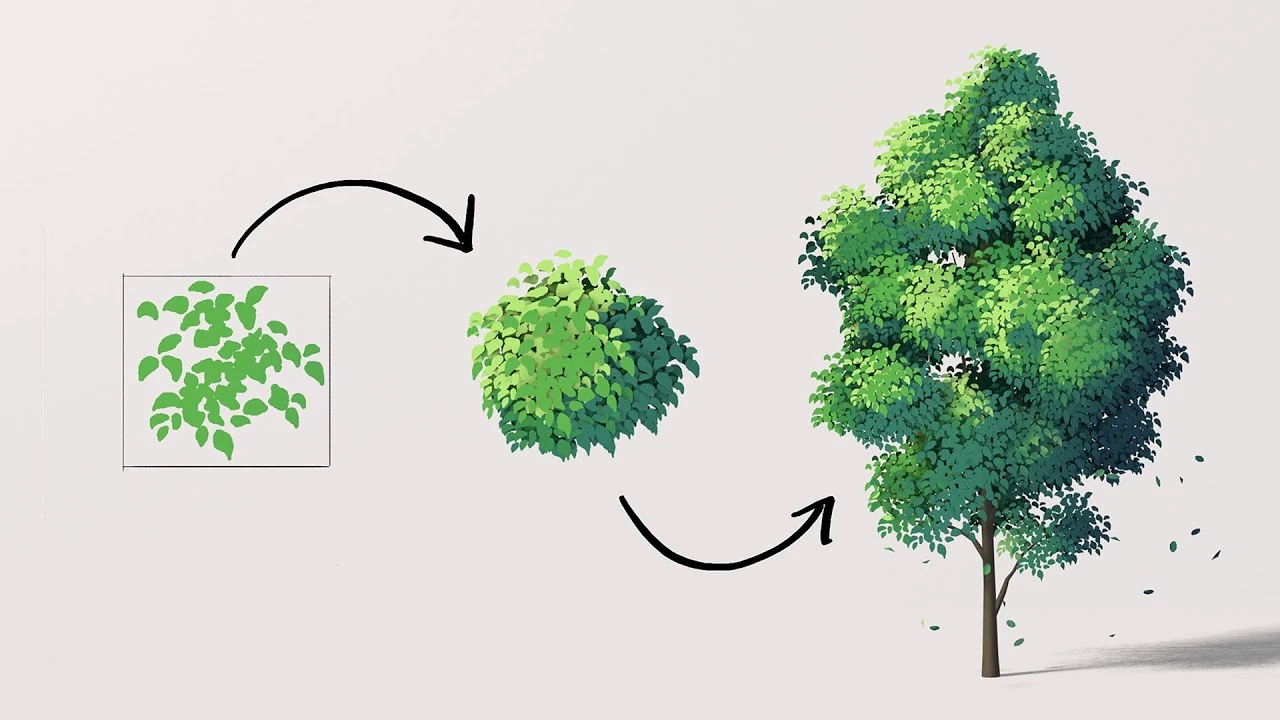
Anime Tree Tutorial | Blender (include Project Files)
🍅 Timer Pomodoro
Estudia 25 min, luego toma un descanso. ¡Mejora la concentración!
Descripción
CC: English & Vietnamese
Note #1: In newer Blender versions, the blend mode was replaced with Render Method, just keep it at default, which is "Dithered".
To turn off shadow per material, inside shader editor, you can use a "mix color" with a "light path" node (choose "Is Shadow Ray"). See here: https://developer.blender.org/docs/re...
Or to turn shadow off per objects: Selecting the object and then, in the sidebar, go to Object Properties/Visibility/Ray Visibility/Shadow (uncheck)
Note #2: This method is still valid in newer Blender version. If you run into any problem in step 1 then please do a check of these following mistakes: Check that your "Vector Rotate" is set to Euler, "Evaluate on Domain" is set to Vector and Face, don't forget to pick your camera in the modifier, always Apply Transformation on the plane to ensure there is no problem.
Note #1: In newer Blender versions, the blend mode was replaced with Render Method, just keep it at default, which is "Dithered".
To turn off shadow per material, inside shader editor, you can use a "mix color" with a "light path" node (choose "Is Shadow Ray"). See here: https://developer.blender.org/docs/re...
Or to turn shadow off per objects: Selecting the object and then, in the sidebar, go to Object Properties/Visibility/Ray Visibility/Shadow (uncheck)
Note #2: This method is still valid in newer Blender version. If you run into any problem in step 1 then please do a check of these following mistakes: Check that your "Vector Rotate" is set to Euler, "Evaluate on Domain" is set to Vector and Face, don't forget to pick your camera in the modifier, always Apply Transformation on the plane to ensure there is no problem.
A continuación






La IA acaba de llegar a Blender… pero no como imaginaba
Aura Prods
My secret animation trick you should always use, Retiming!
Pierrick Picaut
1 Easy Way to Make Better Environments in Blender
ManjuRam
Creating a Massive Realistic Landscape in Blender
Rithick_03d
Make Your Renders MASSIVE - Blender 5.0
WillUrquhart3D
Sculpting a cliff in Blender (timelapse)
Blender Guru
Everything you need about Keying in Blender 3 0
Pierrick Picaut
Easy Fog in Blender
Blender Guru
La forma CORRECTA de cortar agujeros en superficies en Blender
Josh - Blender Bros
How to make PHOTOREALISTIC VFX in Blender - EASY
Phil Flock