¡Tiempo de descanso!
Tu sesión Pomodoro ha terminado
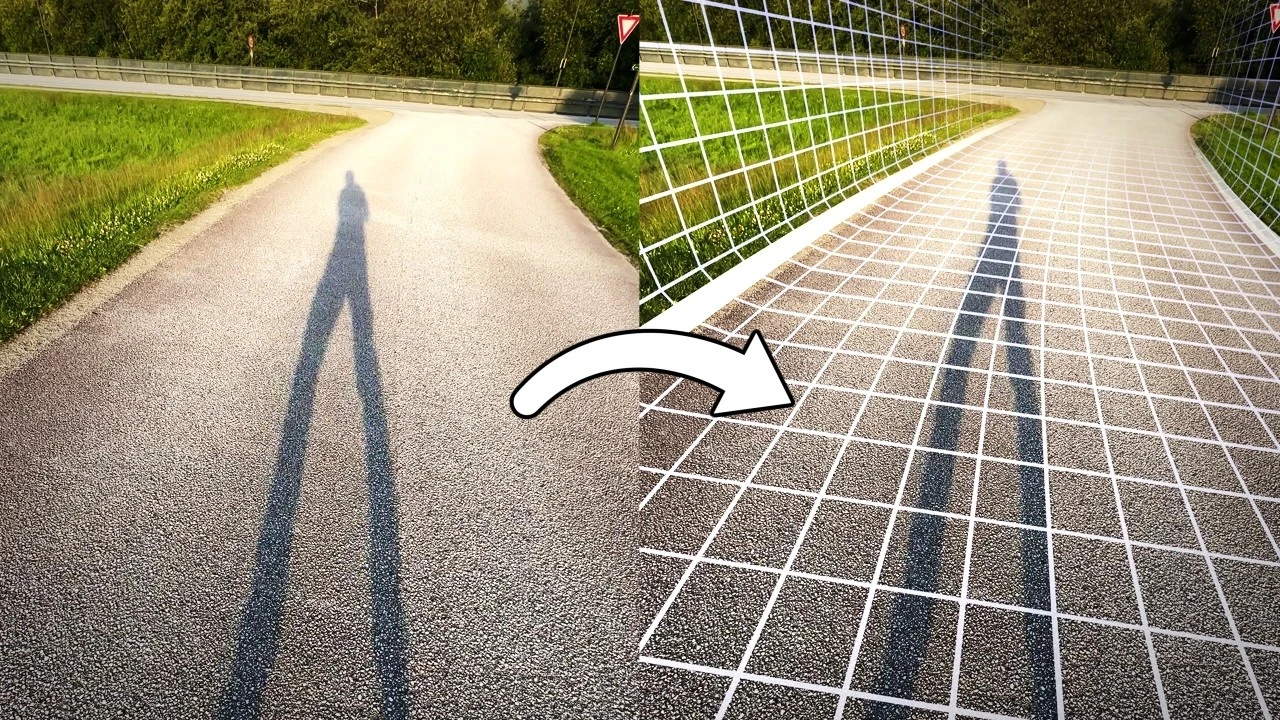
3D tracking will never be the same for me again... (COLMAP workflow)
Avanzado🍅 Timer Pomodoro
Estudia 25 min, luego toma un descanso. ¡Mejora la concentración!
Descripción
In this tutorial we're exploring a fully automated workflow for 3D camera tracking using only free and open-source software! This technique uses the power of photogrammetry with COLMAP to create incredibly precise 3D tracks and point clouds from any video footage.
This tutorial covers the entire process from downloading the necessary tools (COLMAP, FFmpeg and a custom script I've put together) to importing the final animated camera and scene data directly into Blender.
Links:
1️⃣ https://github.com/colmap/colmap/rele...
2️⃣ https://ffmpeg.org/
3️⃣ https://gist.github.com/polyfjord/4ed...
4️⃣ https://github.com/SBCV/Blender-Addon...
⚠️ Check out my 2nd channel video here if you're experiencing an issue with this workflow: • This 3D tracking workflow just got a lot f...
Timestamps:
00:00 Introducing the 100% automated 3D tracker
01:21 Downloading required files
03:29 Creating the folder structure
05:00 Running the batch reconstruct script
06:01 Installing the Photogrammetry Addon to Blender
07:18 Importing a 3D tracked scene to Blender
09:23 Creating proxy files to improve viewport performance
10:51 Track precision demonstration
12:16 Reviewing a 44 second long track
14:02 Reviewing a track with accidental vertical footage
14:42 Importing the point cloud as GeoNodes mesh
17:00 Adding a ground plane to the true ground
18:00 Important tip: Turn of image stabilization!
18:46 Thanks for watching!
This tutorial covers the entire process from downloading the necessary tools (COLMAP, FFmpeg and a custom script I've put together) to importing the final animated camera and scene data directly into Blender.
Links:
1️⃣ https://github.com/colmap/colmap/rele...
2️⃣ https://ffmpeg.org/
3️⃣ https://gist.github.com/polyfjord/4ed...
4️⃣ https://github.com/SBCV/Blender-Addon...
⚠️ Check out my 2nd channel video here if you're experiencing an issue with this workflow: • This 3D tracking workflow just got a lot f...
Timestamps:
00:00 Introducing the 100% automated 3D tracker
01:21 Downloading required files
03:29 Creating the folder structure
05:00 Running the batch reconstruct script
06:01 Installing the Photogrammetry Addon to Blender
07:18 Importing a 3D tracked scene to Blender
09:23 Creating proxy files to improve viewport performance
10:51 Track precision demonstration
12:16 Reviewing a 44 second long track
14:02 Reviewing a track with accidental vertical footage
14:42 Importing the point cloud as GeoNodes mesh
17:00 Adding a ground plane to the true ground
18:00 Important tip: Turn of image stabilization!
18:46 Thanks for watching!
Etiquetas
A continuación







La IA acaba de llegar a Blender… pero no como imaginaba
Aura Prods
1 Easy Way to Make Better Environments in Blender
ManjuRam
The ULTIMATE guide to denoising in Blender | Blender Tutorial
Ethan Davis
Sculpting a cliff in Blender (timelapse)
Blender Guru
Procedural Dark Leather Material (Blender Tutorial)
Ryan King Art
How To Rig And Animate A Gun In Blender
Tvtig
Easy Fog in Blender
Blender Guru
Making Realistic interior in Blender
P-Designz
Realistic Outdoor Lighting In Blender
Extra 3d
Easy Vintage Style Christmas Lights💡Geometry Nodes (Blender Tutorial)
Ryan King Art