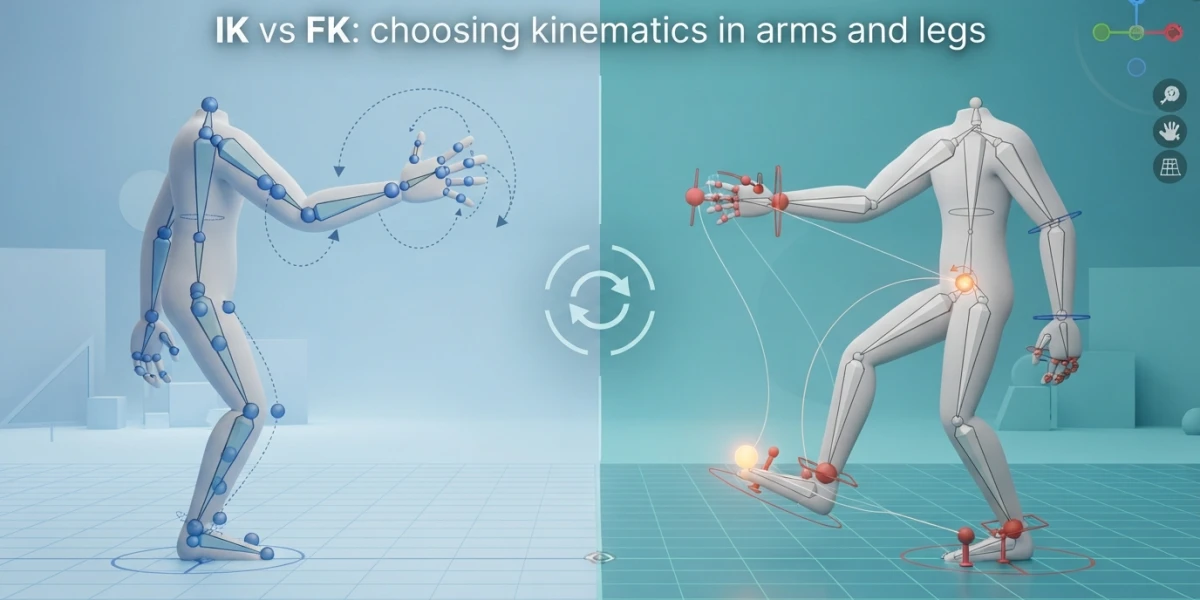
Image generated with AI
IK vs FK in 3D: Legs, Arms, When to Use Each

Diego Cortés
Author
Move one control and the whole arm settles into place. Or move three and the shoulder never notices. That is the difference between forward kinematics (FK) and inverse kinematics (IK), and it is the first technical choice you make when you pose a character.
This is not rigging trivia: it changes how long it takes you to pose a shot, how precisely a foot meets the floor, and whether an arm ends up passing through a wall or resting cleanly on it. Let's look at how each one works, what happens in legs and arms, and when to reach for which.
Forward kinematics (FK): moving one link at a time
In an FK chain, each control moves its own bone and drags every bone below it in the hierarchy, but never the other way around. Rotate the shoulder and the elbow and wrist travel with it; rotate the wrist and the shoulder does not move at all.
That means you pose link by link. To bring a bent arm forward you rotate the shoulder, then the elbow, then the wrist, checking as you go whether the hand landed where you wanted. It is slower, but it has a major payoff: because each joint describes its own rotation, the result is arcs of motion, exactly the way a human arm moves when someone talks or gestures.
Inverse kinematics (IK): an invisible string calls the shots
IK works the other way around. Instead of travelling forward along the chain, you grab a single end control and the system works out how the bones above it must bend to reach that point. Think of a puppet: an invisible string runs down from each joint, and pulling that string stretches the bone while the rest of the chain adapts.
In practice you pose with one control: move the hand control and the entire arm resolves itself. A second control comes with it, and it matters just as much, the pole vector. It governs which way the joint bends: for an arm it decides where the elbow points, for a leg it decides where the knee points.
Switching between FK and IK in the rig
Professional rigs do not force a permanent choice: they ship an attribute that acts as a switch. It is usually split per side (left arm, right arm) and takes two values, where 0 is FK and 1 is IK. Legs can be switched to FK as well, which is what you want for parkour or acrobatic actions where the feet leave the ground entirely.
One practical tip: keep the switch at 0 or 1 while you work. Some rigs accept intermediate decimals, but blending both behaviours usually muddies the result.
Legs: IK nearly all the time
Legs are IK territory. Picture a character lowering their hips: with IK legs the feet stay planted exactly where they are and the knees bend to absorb the motion, just like you do when you crouch in real life. With FK legs, lowering the hips would push the feet through the floor, because they hang from the hierarchy.
That is why character rigs ship with IK legs and provide controls built for ground contact, such as foot rotation and foot roll, which lets you lift the heel or plant it without disturbing the rest of the leg. This is where a pose either feels grounded or starts to float.
Two things worth checking on every leg pose:
- Knees point, in the vast majority of cases, in the same direction as the toes. The pole vector is what controls that orientation.
- The pose has to work from the side, not just the front. A foot can look perfect head on and be buried inside the other leg once you orbit the view.
Arms: it depends on contact
Arms are the mixed case, and where an animator's judgement shows most. They default to FK, because most arm gestures are arcs: talking with your hands, pointing, waving. FK wins there, since the arc comes for free.
IK becomes essential the moment there is physical contact. If the character rests a hand on a table, on a wall, or grabs a ledge to climb, FK will pull the hand away as soon as you move the body, and it will most likely pass straight through the geometry. With IK the hand control stays locked in place while the rest of the body moves around it.
Mixing is perfectly fine: leave one arm on FK for gestures and switch the other to IK because it is leaning on something. That is standard in a shot where a character talks while resting on a railing.
The difference you feel while animating: arcs versus lines
Here is the most concrete consequence, and the one worth testing yourself. Set two poses several frames apart and study the path of the motion:
- With FK, the control travels along a clean arc from the first pose to the last.
- With IK, that same journey tends to be a straight line, because the control travels directly to its target.
Neither is wrong, but a straight line in an arm reads as mechanical. The fix with IK is to build the in-between pose: add a frame halfway through where the control passes above or outside the direct path, and the travel recovers its curve. That is extra work you simply avoid by using FK whenever there is no contact involved.
Common mistakes
- Forgetting the clavicle. The shoulder is not decoration: when the arm goes up, the shoulder goes up; when the arm reaches forward, the clavicle follows. Skip it and the arm detaches from the torso, especially in contrasting poses.
- Leaving the switch halfway. An attribute stuck between FK and IK makes the pose behave unpredictably.
- Bad knee orientation. A knee pointing inward or outward kills the sense of weight, even when the pose is otherwise balanced.
- Only checking the front view. Build and review poses from above, from the side and in perspective. A foot buried in the opposite leg is the most common offender.
When to use each, in short
- IK whenever there is contact with the environment: feet on the floor, hands on a table or wall, grips while climbing.
- IK for legs as the default, and FK for stunts where the legs fly free.
- FK for arms on gestures, dialogue and any motion without contact, where the natural arc works in your favour.
- Mix both when one arm is resting and the other is gesturing.
Keep practising
The fastest way to really get this is the classic exercise: pose one arm in FK, keyframe both ends and watch the path it travels; then repeat with the same arm switched to IK. The difference is obvious within seconds, and from then on choosing between them stops being a guess and becomes a deliberate decision.
On the platform you will find video tutorials on rigging and animation where these ideas are applied to real rigs, with characters walking, leaning and reacting. Forward and inverse kinematics are the foundation of everything that comes after, so they are worth the time until the choice becomes automatic.